
Apple Final Cut Pro X (10.0.9) User Manual
Page 365
Chapter 13
Color correction
365
Delete a shape mask
1
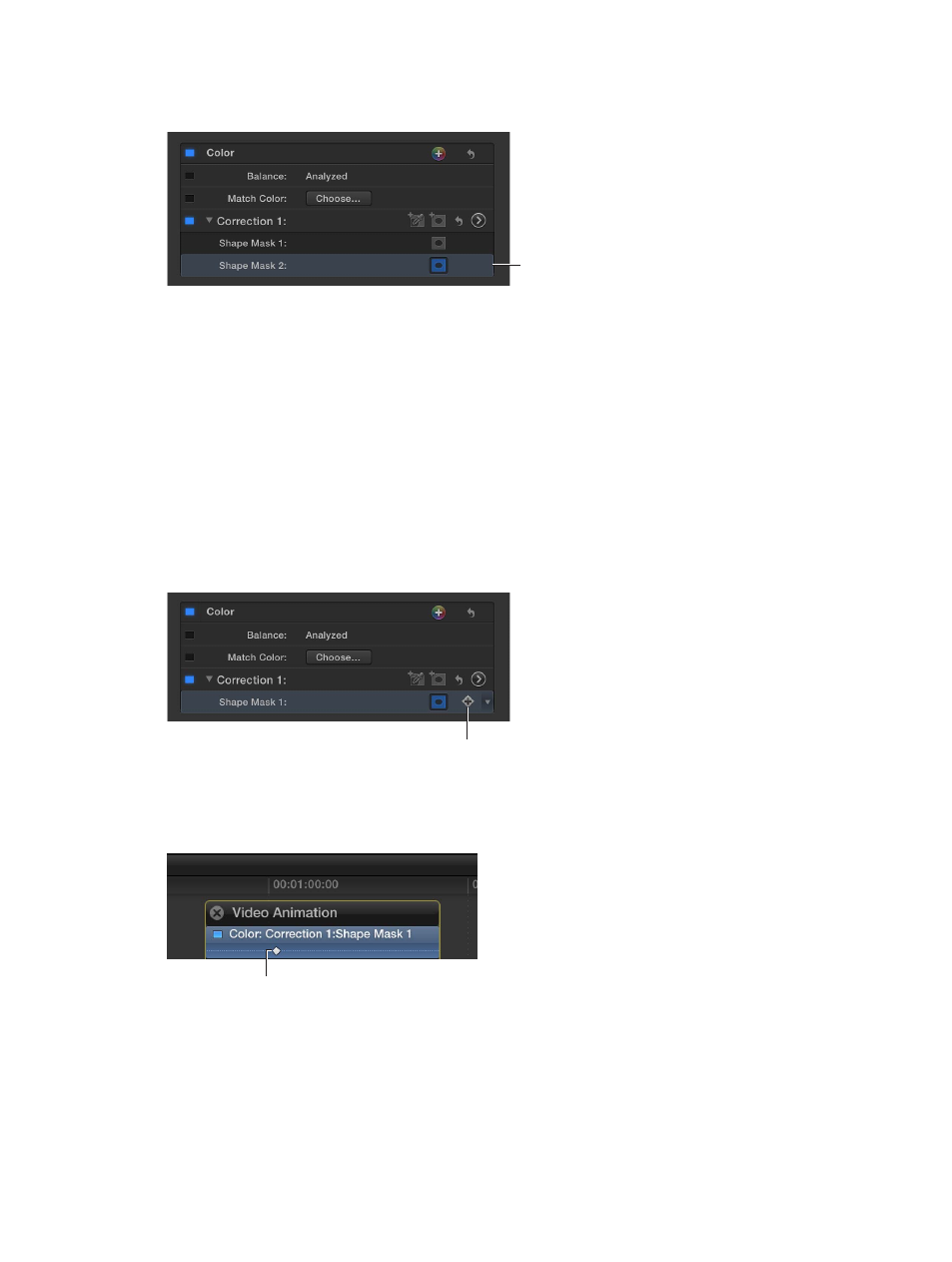
In the Video inspector, select the Shape Mask item you want to delete.
Select a Shape Mask
item and press Delete.
2
Press Delete.
Note: If you delete all shape masks in the correction, the Inside Mask corrections are applied to
the whole image.
Animate a shape mask
You can use keyframes to animate a shape mask so that it follows the movement of an
onscreen object.
1
To add a shape mask, follow the instructions in “Add a shape mask,” above.
2
In the Timeline, position the playhead on the clip with the shape mask at the frame where you
want the shape to begin moving.
3
Position the shape mask to its starting position in the Viewer.
4
In the Video inspector, click the Keyframe button.
Click here to add
a keyframe.
A keyframe is added at the position of the playhead. You can see it in the Timeline by pressing
Control-V to open the Video Animation Editor. The keyframe appears in the Color section as a
diamond at the playhead position.
Keyframe indicator
- Numbers '09 (254 pages)
- Keynote '09 (247 pages)
- Pages '09 (279 pages)
- Boot Camp Mac OS X v10.6 Snow Leopard (18 pages)
- Boot Camp Mac OS X v10.6 Snow Leopard (19 pages)
- iWork '09 (372 pages)
- Mac OS X v10.6 Snow Leopard (7 pages)
- GarageBand '08 (102 pages)
- iDVD '08 (35 pages)
- GarageBand '09 (122 pages)
- iWeb (37 pages)
- iMovie '08 (50 pages)
- Boot Camp (Mac OS X v10.5 Leopard) (27 pages)
- Boot Camp (Mac OS X v10.5 Leopard) (25 pages)
- Mac OS X v10.5 Leopard (16 pages)
- Mac OS X (622 pages)
- Mac OS X Server (Version 10.6 Snow Leopard) (197 pages)
- Mac OS (42 pages)
- Mac OS X Server (Upgrading and Migrating For Version 10.4 or Later) (97 pages)
- iMovie HD (83 pages)
- iMovie HD (47 pages)
- MAC OS 7.6.1 (4 pages)
- Mac OS X Server (Extending Your Wiki Server For Version 10.5 Leopard) (45 pages)
- Mac OS X Server Ver 10.4 (35 pages)
- Mac OS X Server v10.6 (76 pages)
- Mac OS X Server v10.6 (97 pages)
- Macintosh Japanese Language Kit (30 pages)
- Xserve (Early 2008) DIY Procedure for Hard Drive (3 pages)
- Xserve (8 pages)
- Xserve (60 pages)
- GarageBand 3 (98 pages)
- Remote Desktop 3.1 (191 pages)
- Motion 5.1.1 (1090 pages)
- Workgroup Server 8150/110 (144 pages)
- Aperture (476 pages)
- Xserve Intel (Late 2006) DIY Procedure for Optical Drive Cable (7 pages)
- Xserve Intel (Late 2006) DIY Procedure for Optical Drive Cable (6 pages)
- Network Services Location Manager Network (8 pages)
- Macintosh System 7.5 (65 pages)
- Macintosh System 7.5 (126 pages)
- Macintosh System 7.5 (114 pages)
- DVD Studio Pro 4 (656 pages)
- Keynote '08 (204 pages)
- Xsan 2 (Second Edition) (11 pages)
- LiveType 2 (157 pages)