
Apple Final Cut Pro X (10.0.9) User Manual
Page 335
Chapter 12
Keying and compositing
335
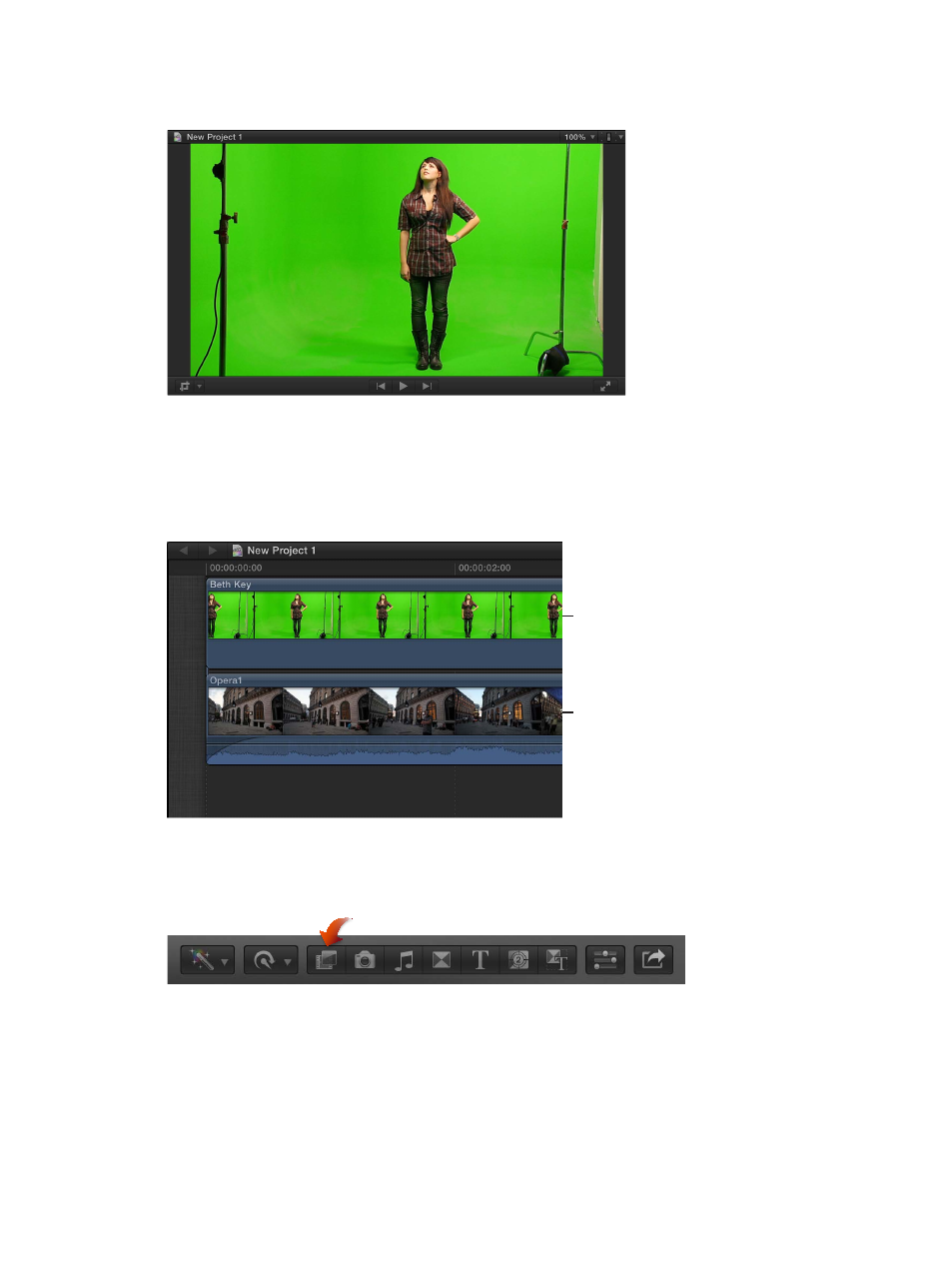
For the following examples, this woman will be keyed over a street scene. The light stands will be
handled in
on page 348.
Apply the chroma key effect
1
In the Timeline, add the foreground clip (the chroma key clip with the color you want to remove)
to the primary storyline.
2
Drag the background clip (the clip you want to superimpose the chroma key clip over) so that it
is connected below the foreground clip in the primary storyline.
Foreground
Background
attached as a
connected clip
For more information about connected clips, see
Connect clips to add cutaway shots, titles, and
on page 103.
3
Select the foreground clip in the Timeline, and click the Effects button in the toolbar.
Tip: For best results, also position the playhead at a point within the foreground clip that shows
the maximum amount of the color to be keyed.
4
In the Effects Browser, select the Keyer effect.
Tip: Type “keyer” in the Effects Browser’s search field to quickly find the Keyer effect.
- Numbers '09 (254 pages)
- Keynote '09 (247 pages)
- Pages '09 (279 pages)
- Boot Camp Mac OS X v10.6 Snow Leopard (19 pages)
- Boot Camp Mac OS X v10.6 Snow Leopard (18 pages)
- iWork '09 (372 pages)
- Mac OS X v10.6 Snow Leopard (7 pages)
- GarageBand '08 (102 pages)
- iDVD '08 (35 pages)
- GarageBand '09 (122 pages)
- iWeb (37 pages)
- iMovie '08 (50 pages)
- Boot Camp (Mac OS X v10.5 Leopard) (27 pages)
- Boot Camp (Mac OS X v10.5 Leopard) (25 pages)
- Mac OS X v10.5 Leopard (16 pages)
- Mac OS X (622 pages)
- Mac OS X Server (Version 10.6 Snow Leopard) (197 pages)
- Mac OS (42 pages)
- Mac OS X Server (Upgrading and Migrating For Version 10.4 or Later) (97 pages)
- iMovie HD (47 pages)
- iMovie HD (83 pages)
- MAC OS 7.6.1 (4 pages)
- Mac OS X Server (Extending Your Wiki Server For Version 10.5 Leopard) (45 pages)
- Mac OS X Server Ver 10.4 (35 pages)
- Mac OS X Server v10.6 (76 pages)
- Mac OS X Server v10.6 (97 pages)
- Macintosh Japanese Language Kit (30 pages)
- Xserve (Early 2008) DIY Procedure for Hard Drive (3 pages)
- Xserve (8 pages)
- Xserve (60 pages)
- GarageBand 3 (98 pages)
- Remote Desktop 3.1 (191 pages)
- Motion 5.1.1 (1090 pages)
- Workgroup Server 8150/110 (144 pages)
- Aperture (476 pages)
- Xserve Intel (Late 2006) DIY Procedure for Optical Drive Cable (6 pages)
- Xserve Intel (Late 2006) DIY Procedure for Optical Drive Cable (7 pages)
- Network Services Location Manager Network (8 pages)
- Macintosh System 7.5 (114 pages)
- Macintosh System 7.5 (65 pages)
- Macintosh System 7.5 (126 pages)
- DVD Studio Pro 4 (656 pages)
- Keynote '08 (204 pages)
- Xsan 2 (Second Edition) (11 pages)
- LiveType 2 (157 pages)