
Finding and closing gaps, P. 387) – Apple Final Cut Express HD User Manual
Page 387
Chapter 27
Arranging Clips in the Timeline
387
VI
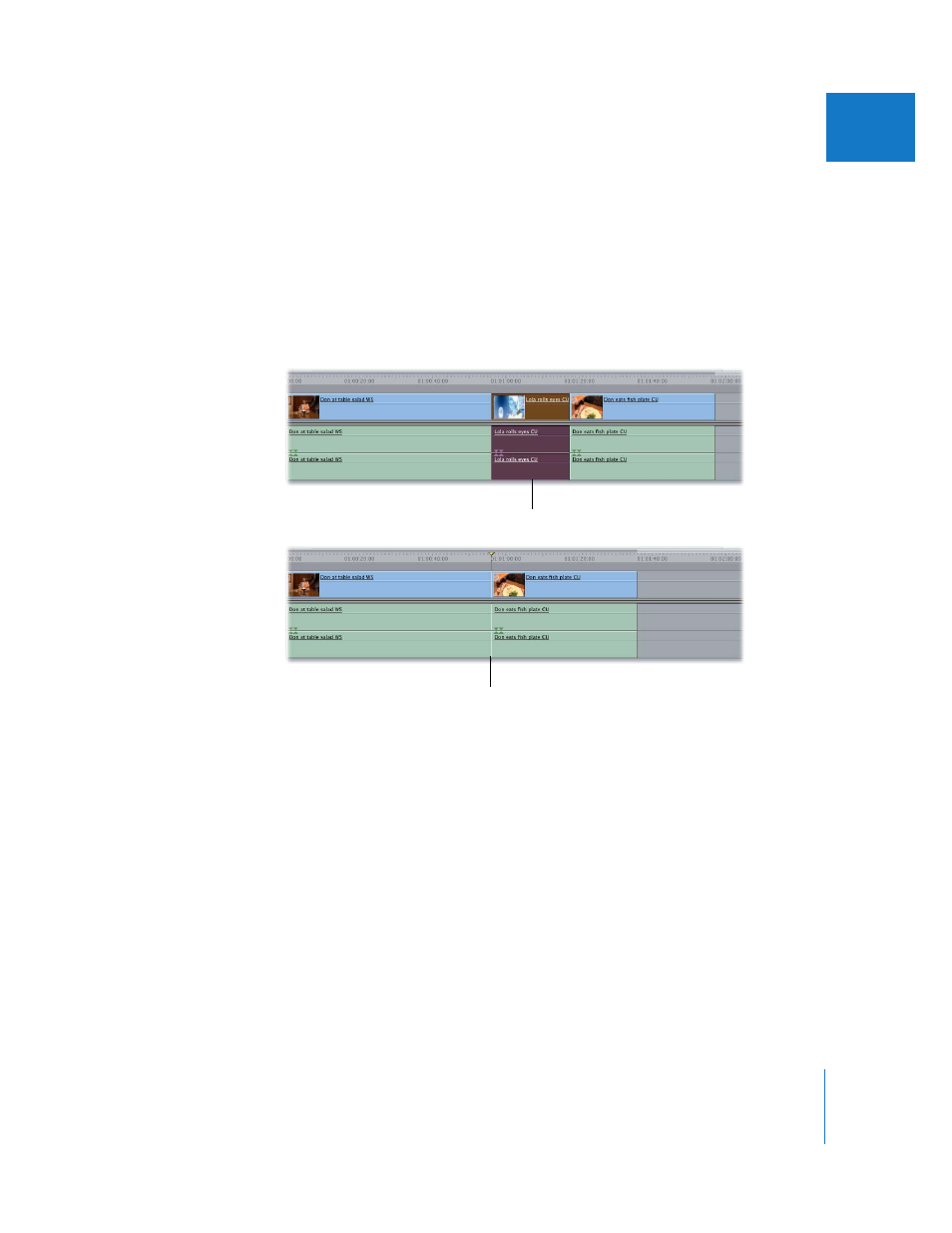
To delete a clip item and close the gap left behind:
1
Select the item or range of items you want to remove.
2
Do one of the following:
 Choose Sequence > Ripple Delete.
 Control-click the selected clip item or items, then choose Ripple Delete from the
shortcut menu.
 Press Shift-Delete.
 Press Shift-X to cut the material, if you want to paste it somewhere else.
Finding and Closing Gaps
As you edit, cut, paste, and move items around in Final Cut Express HD, empty spaces
(called gaps) may be left between clips in your sequence. Sometimes they are extremely
small (one or two frames), which makes them difficult to see in the Timeline. When a
sequence with gaps plays back in the Canvas, however, even tiny gaps are apparent as
flashes of black, so you don’t want to unintentionally leave them in the sequence.
Selected clip items
After the ripple delete, the
clip items are removed, with
no gap remaining.
- Numbers '09 (254 pages)
- Keynote '09 (247 pages)
- Pages '09 (279 pages)
- Boot Camp Mac OS X v10.6 Snow Leopard (18 pages)
- Boot Camp Mac OS X v10.6 Snow Leopard (19 pages)
- iWork '09 (372 pages)
- Mac OS X v10.6 Snow Leopard (7 pages)
- GarageBand '08 (102 pages)
- iDVD '08 (35 pages)
- GarageBand '09 (122 pages)
- iWeb (37 pages)
- iMovie '08 (50 pages)
- Boot Camp (Mac OS X v10.5 Leopard) (27 pages)
- Boot Camp (Mac OS X v10.5 Leopard) (25 pages)
- Mac OS X v10.5 Leopard (16 pages)
- Mac OS X (622 pages)
- Mac OS X Server (Version 10.6 Snow Leopard) (197 pages)
- Mac OS (42 pages)
- Mac OS X Server (Upgrading and Migrating For Version 10.4 or Later) (97 pages)
- iMovie HD (83 pages)
- iMovie HD (47 pages)
- MAC OS 7.6.1 (4 pages)
- Mac OS X Server (Extending Your Wiki Server For Version 10.5 Leopard) (45 pages)
- Mac OS X Server Ver 10.4 (35 pages)
- Mac OS X Server v10.6 (76 pages)
- Mac OS X Server v10.6 (97 pages)
- Macintosh Japanese Language Kit (30 pages)
- Xserve (Early 2008) DIY Procedure for Hard Drive (3 pages)
- Xserve (8 pages)
- Xserve (60 pages)
- GarageBand 3 (98 pages)
- Remote Desktop 3.1 (191 pages)
- Motion 5.1.1 (1090 pages)
- Workgroup Server 8150/110 (144 pages)
- Aperture (476 pages)
- Xserve Intel (Late 2006) DIY Procedure for Optical Drive Cable (7 pages)
- Xserve Intel (Late 2006) DIY Procedure for Optical Drive Cable (6 pages)
- Network Services Location Manager Network (8 pages)
- Macintosh System 7.5 (65 pages)
- Macintosh System 7.5 (126 pages)
- Macintosh System 7.5 (114 pages)
- DVD Studio Pro 4 (656 pages)
- Keynote '08 (204 pages)
- Xsan 2 (Second Edition) (11 pages)
- LiveType 2 (157 pages)