
Dell Inspiron 3500 User Manual
Page 112
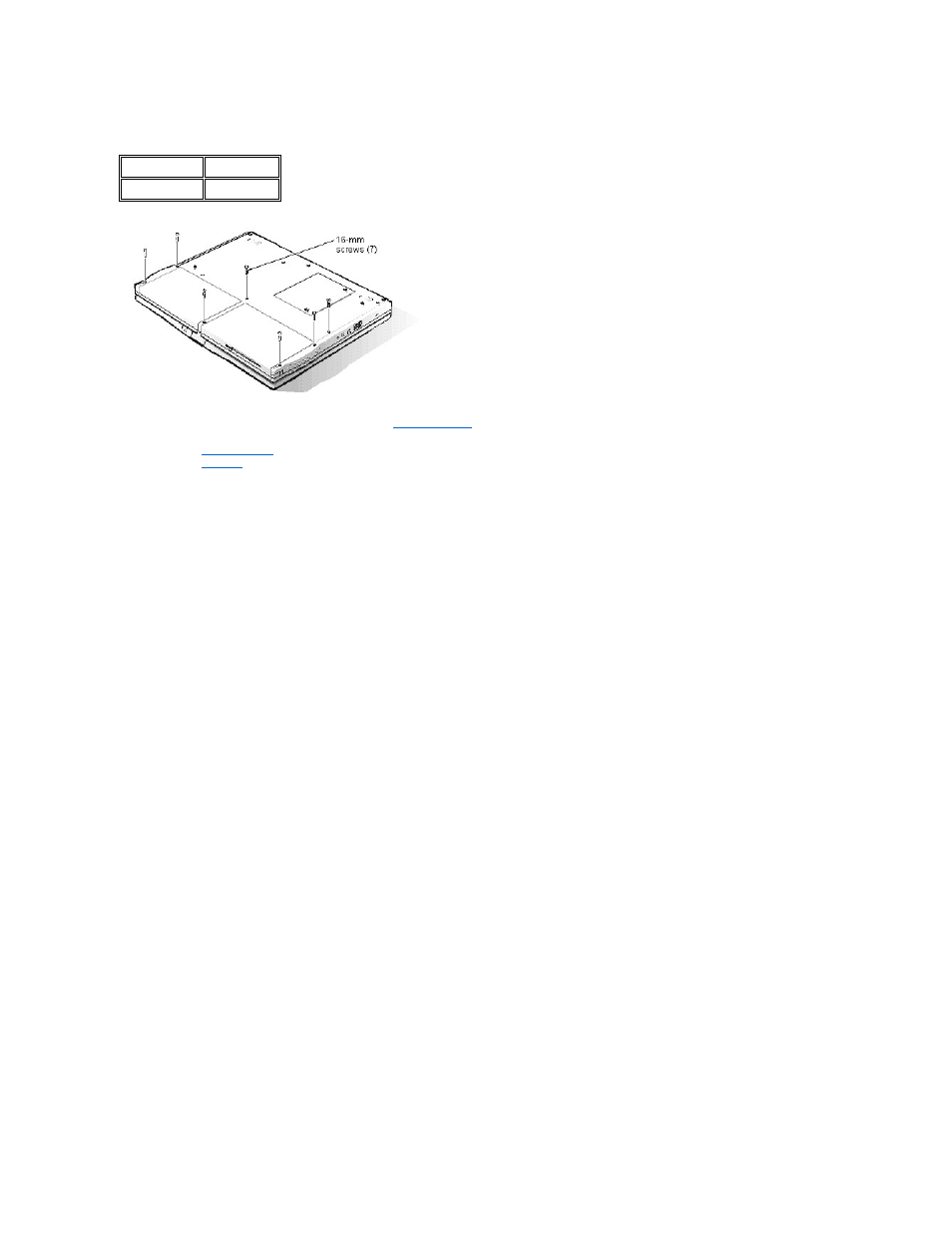
Palmrest Assembly Removal: Dell™ Inspiron™ 3500 Portable Computer
To remove the palmrest assembly, see the exploded view of the
palmrest assembly
and perform the following steps:
1. Remove the
display assembly
.
2. Remove the
keyboard
.
3. Turn the computer face down.
4. Remove the seven 19-mm palmrest screws from the bottom of the computer.
5. Turn the computer face up.
6. Remove the palmrest assembly.
After installing the palmrest assembly, make sure that the battery-bay release latch and the options-bay release latch operate smoothly. If they do not, slightly loosen the
two palmrest assembly screws that secure the latches so that the latches move easily.
Type of Screw
Torque
FPH 2.5 x 19 (7) 3.5–4.0 kgf-cm
See also other documents in the category Dell Notebooks:
- Latitude E6410 (52 pages)
- Latitude E6410 (8 pages)
- Latitude D630 (218 pages)
- Latitude E6400 (99 pages)
- Latitude E6400 (70 pages)
- Latitude E6400 (2 pages)
- Latitude E6400 (8 pages)
- Latitude E6400 (4 pages)
- Latitude D630 (168 pages)
- Latitude D630 (43 pages)
- Latitude D630 (69 pages)
- Latitude D620 (43 pages)
- Latitude D620 (102 pages)
- Inspiron 1545 (4 pages)
- Inspiron 1545 (51 pages)
- Inspiron 1545 (72 pages)
- LATITUDE C510 (55 pages)
- LATITUDE C510 (170 pages)
- Inspiron 1200 (45 pages)
- Latitude D531 (Mid 2007) (46 pages)
- Latitude D531 (224 pages)
- Inspiron 1300 (44 pages)
- Inspiron 1300 (142 pages)
- INSPIRON 2600 (168 pages)
- INSPIRON 2600 (2 pages)
- INSPIRON 2600 (134 pages)
- INSPIRON 2600 (87 pages)
- Inspiron 1100 (40 pages)
- Inspiron 1100 (164 pages)
- Inspiron 5150 (160 pages)
- Inspiron E1505 (45 pages)
- Inspiron E1505 (186 pages)
- Inspiron 1150 (38 pages)
- Inspiron 1150 (112 pages)
- Inspiron 3520 (72 pages)
- Inspiron M5040 (2 pages)
- A860 (96 pages)
- 1000 (98 pages)
- STREAK 7 (141 pages)
- XPS 14Z (L412z) (2 pages)
- Latitude D520 (96 pages)
- Latitude D520 (168 pages)
- Latitude D520 (99 pages)
- Latitude D520 (42 pages)
- Latitude D520 (124 pages)