
Saving your settings (setups), Recalling a setup – Roland V-Piano User Manual
Page 59
59
Saving your settings (Setups)
You can save the V-Piano’s various settings as a “setup” and switch between different setups as appropriate for the songs you’re
playing.
The setups you save can be backed up to USB memory (sold separately) (p. 85).
The current settings will be lost when you recall another setup. If you want to keep the current settings, save them to a setup
before you continue (p. 58).
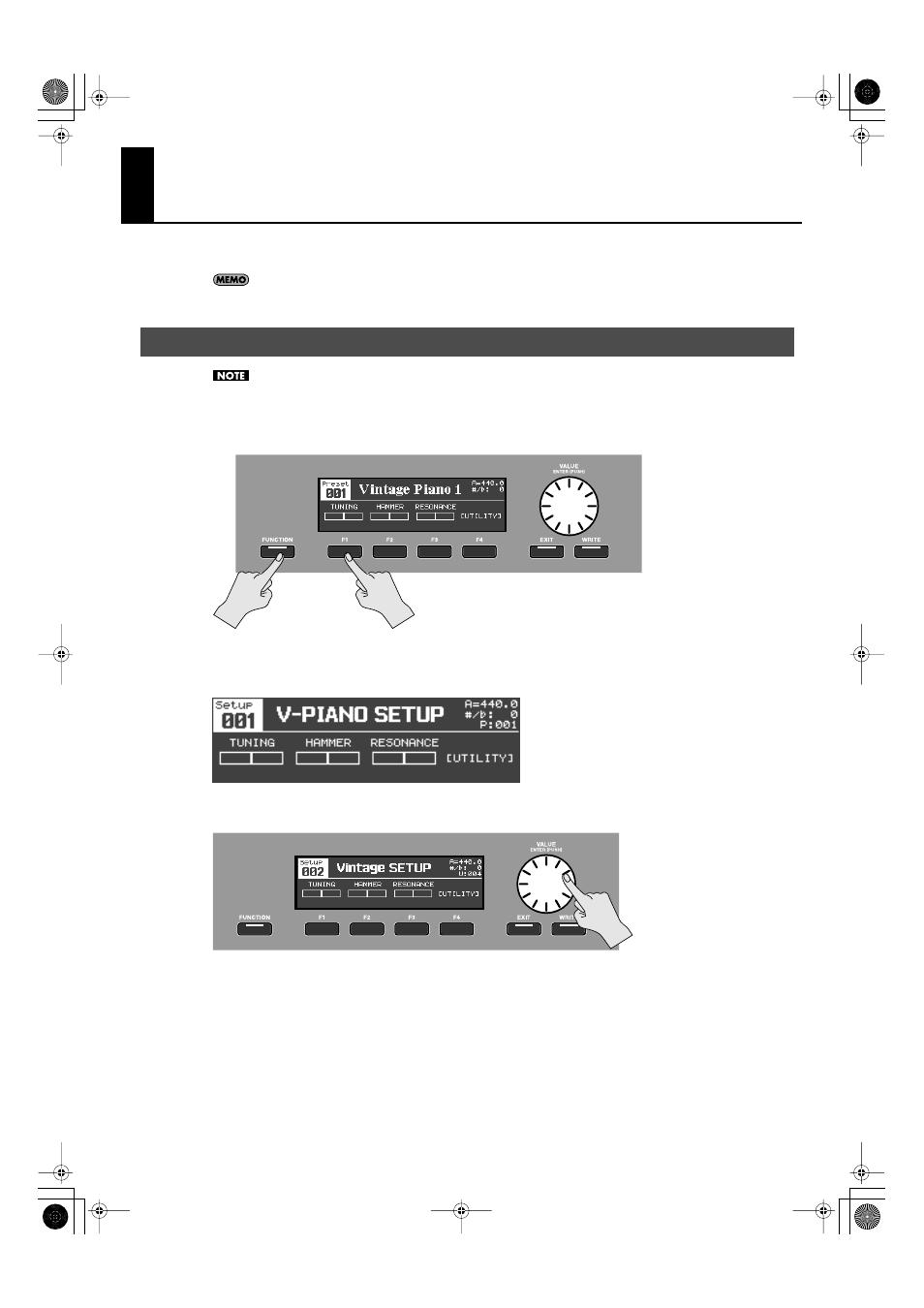
1.
Hold down the [FUNCTION] button and press the [F1] button.
fig.SetupSel01.eps
2.
The number of the currently selected setup will appear.
fig.Setup00.eps
3.
Turn the [VALUE] dial to select the desired setup.
fig.SetupSel02.eps
4.
Once again hold down the [FUNCTION] button and press the [F1] button to return to the tone screen.
Recalling a setup
V-Piano_e.book 59 ページ 2009年1月28日 水曜日 午前9時10分
- JUNO-D (132 pages)
- HP102e (224 pages)
- Fantom-S88 (228 pages)
- AT15 (120 pages)
- GR-UPR-P (5 pages)
- RK-300 (228 pages)
- DP-1000 (29 pages)
- DP990RF (2 pages)
- HPi-5 (68 pages)
- Classic Organ C-200 (52 pages)
- Digital Piano LX-15 (64 pages)
- ATELIER 5100001499-01 (144 pages)
- KR-15 (212 pages)
- F-50 (36 pages)
- GAIA D-501987 (16 pages)
- HP302 (92 pages)
- ATELIER AT-500 (272 pages)
- Atelier AT900 (308 pages)
- V-Synth GT (248 pages)
- MP-60 (44 pages)
- FP-4-BK (4 pages)
- V-Arranger Keyboard VA-76 (264 pages)
- ATELIER AT-100 (148 pages)
- HP-207 (120 pages)
- DP-990 (108 pages)
- DP990F (2 pages)
- HP-7/3 (52 pages)
- SH-201 (84 pages)
- E-50 (220 pages)
- Backing Keyboard BK-5 (152 pages)
- MIDI Implementation DP990F (32 pages)
- RD-700NX (106 pages)
- JUNO-Di (136 pages)
- HP-203 (108 pages)
- KR111 (186 pages)
- KF-90 (196 pages)
- HPi-6 (124 pages)
- Lucina AX-09 (12 pages)
- GW-8 ReleaseNote 2 (32 pages)
- EP-880 (216 pages)
- FR-3sb (66 pages)
- VIMA RK-100 (76 pages)
- HP 237R (44 pages)
- cakewalk A-300PRO (92 pages)
- EDIROL PCR-300 (2 pages)