
Dell Inspiron 530s (Mid 2007) User Manual
Page 140
140
Removing and Installing Parts
NOTE:
The location of connectors on the system board may vary depending on
your compute. See "Inside View of Your Computer" on page 108.
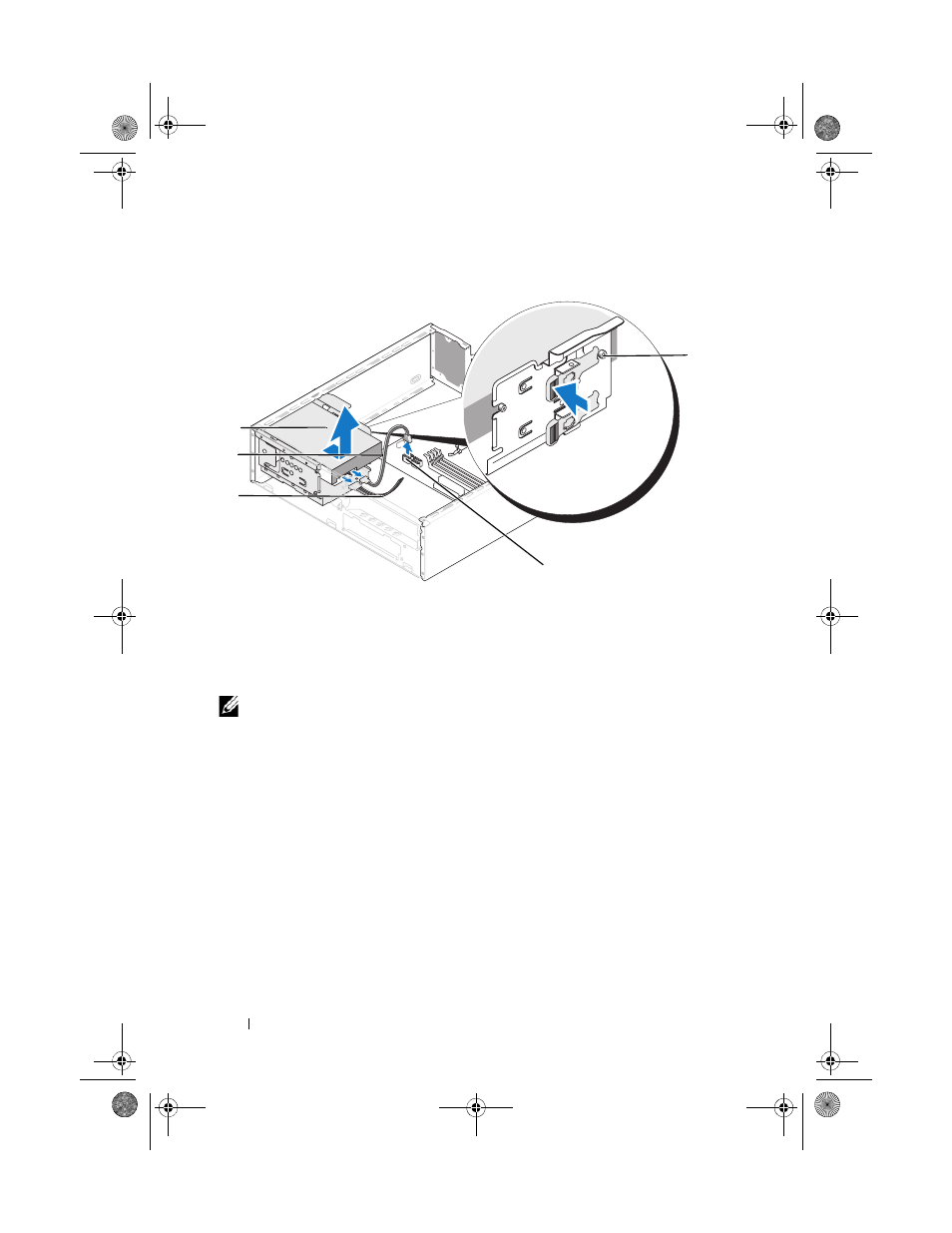
6 Press in on the securing tab on the side of the drive and slide the drive up
and out.
7 If removing this drive changes the drive configuration, then be sure to
reflect these changes in system setup. When you restart your computer,
enter system setup (see "System Setup" on page 185), then go to the
"Drives" section of the System Setup and under Drive 0 through 3, set the
Drive to the correct configuration.
8 Replace the support bracket (see "Replacing the Support Bracket" on
9 Replace the computer cover (see "Replacing the Computer Cover" on
10 Connect computer and other devices to an electrical outlet.
1
shoulder screws (4)
2
system board
connector
3
power cable
4
serial ATA data cable
5
hard drive
4
2
3
1
5
book.book Page 140 Monday, October 6, 2008 11:38 AM
- Inspiron 530 (2 pages)
- OptiPlex 755 (82 pages)
- OptiPlex 755 (45 pages)
- OptiPlex 755 (248 pages)
- OptiPlex 755 (622 pages)
- OptiPlex 755 (528 pages)
- OptiPlex 760 (76 pages)
- OptiPlex 760 (203 pages)
- OptiPlex 745 (360 pages)
- OptiPlex 745 (428 pages)
- OptiPlex 745 (212 pages)
- OptiPlex 780 (14 pages)
- OptiPlex 780 (89 pages)
- OptiPlex 780 (10 pages)
- OptiPlex 780 (74 pages)
- OptiPlex 780 (80 pages)
- OptiPlex 780 (73 pages)
- OptiPlex 780 (40 pages)
- OptiPlex GX620 (338 pages)
- OptiPlex GX620 (221 pages)
- OptiPlex GX620 (294 pages)
- Inspiron 530 (226 pages)
- OptiPlex 960 (Late 2008) (16 pages)
- OptiPlex GX260 (100 pages)
- OptiPlex GX260 (235 pages)
- OptiPlex FX160 (Late 2008) (20 pages)
- OptiPlex FX160 (Late 2008) (132 pages)
- OptiPlex FX160 (20 pages)
- OptiPlex 210L (258 pages)
- OptiPlex 210L (150 pages)
- OptiPlex 210L (130 pages)
- OptiPlex 210L (128 pages)
- OptiPlex 210L (300 pages)
- OptiPlex 320 (44 pages)
- OptiPlex 320 (140 pages)
- OptiPlex 320 (132 pages)
- OptiPlex 320 (312 pages)
- OptiPlex 320 (266 pages)
- OptiPlex 320 (356 pages)
- OptiPlex GX240 (86 pages)
- OptiPlex GX240 (283 pages)
- OptiPlex GX240 (298 pages)
- OptiPlex GX240 (182 pages)
- OptiPlex GX240 (144 pages)
- OptiPlex GX240 (121 pages)