
Epson STYLUS 7900 User Manual
Page 93
93
Printing With Epson Drivers for Macintosh
|
93
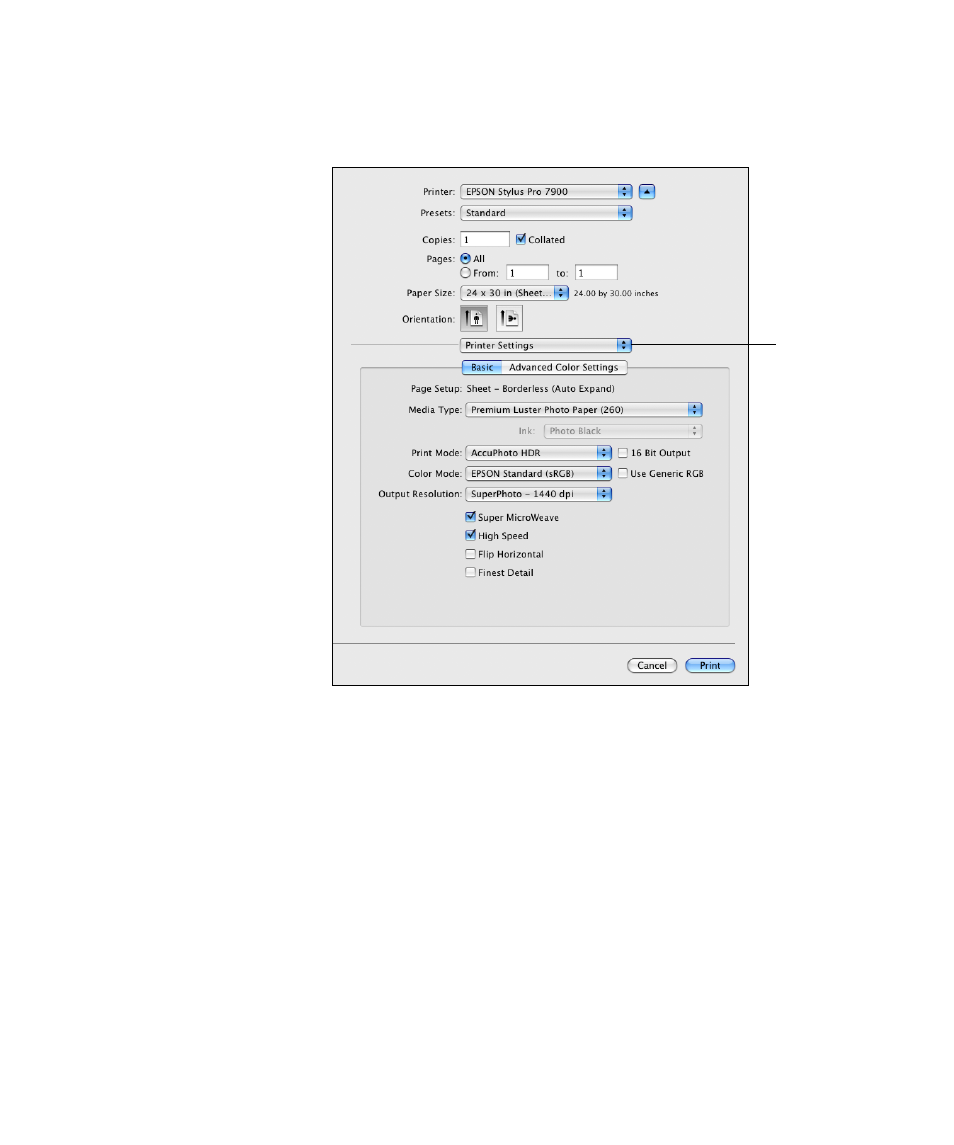
7. Select
Printer Settings
from the drop-down menu. You see this screen:
8. If you created a custom paper size for your roll paper, select the
Auto
Expand
or
Retain Size
option in the
Paper Size
drop-down menu.
See page 88 for details.
9. Select the
Media Type
that corresponds to the paper you are printing
on. See the table on page 121 for more information.
10. For the
Print Mode
setting, select one of the following:
•
AccuPhoto™ HDR
for any type of photographic printing. If you
are printing 16-bit color images, select
16 Bit Output
for the most
accurate transitions and gradations.
•
Advanced B&W Photo
if you are printing black and white photos
using this unique printer technology on select paper types. See
page 116 for more information. (For paper types that don’t support
this option, print black and white photos with the
Color
setting.)
Select
Printer
Settings
- Stylus Pro 7800 (11 pages)
- Stylus Pro 4000 (49 pages)
- Stylus Photo R300 (2 pages)
- Stylus Pro 7000 (147 pages)
- AcuLaser C3000 (316 pages)
- Stylus Pro 7900 (24 pages)
- Stylus Pro 4450 (21 pages)
- 1000 (272 pages)
- T034120 (4 pages)
- T580300 (4 pages)
- 300 (91 pages)
- B 510DN (190 pages)
- B 510DN (218 pages)
- Stylus NX510 (8 pages)
- Stylus Photo RX580 (95 pages)
- T549300 (4 pages)
- AculaserCX11NF (5 pages)
- B 500DN (168 pages)
- 480SXU (24 pages)
- 4500 (317 pages)
- STYLUS RX500 (99 pages)
- 2100 (13 pages)
- Stylus NX215 (2 pages)
- T098320 (4 pages)
- T041020 (4 pages)
- R210 (8 pages)
- All-In-One Stylus Photo RX600 (164 pages)
- 777I (53 pages)
- T033120 (4 pages)
- Stylus CX7000F (8 pages)
- 60 (113 pages)
- T034220 (4 pages)
- WorkForce 40 Series (36 pages)
- T054220 (4 pages)
- Stylus CX3200 (11 pages)
- Stylus CX7800 (18 pages)
- T060220 (4 pages)
- 2500 (180 pages)
- AcuLaser CX11N (32 pages)
- AcuLaser CX11N (4 pages)
- 2000P (16 pages)
- T606600 (4 pages)
- Stylus CX6000 (18 pages)
- FS-4000DN (2 pages)
- MSDS T544700 (4 pages)