
Choosing basic print options – Epson STYLUS 7900 User Manual
Page 125
125
Printing With Epson Drivers for Windows
|
125
Choosing Basic Print Options
The driver offers automatic settings that optimize print quality and speed
when you’re using Epson media. You can also choose custom settings for
more control over your printer and color management options.
Follow these steps to make basic settings:
1. Start an application, open the file you want to print, and select
in
your application. You see the Print window.
2. Make sure your printer is selected, then click the
Properties
or
Preferences
button. (If you see a
Setup
,
Printer
, or
Options
button,
click it instead. Then click
Properties
or
Preferences
.)
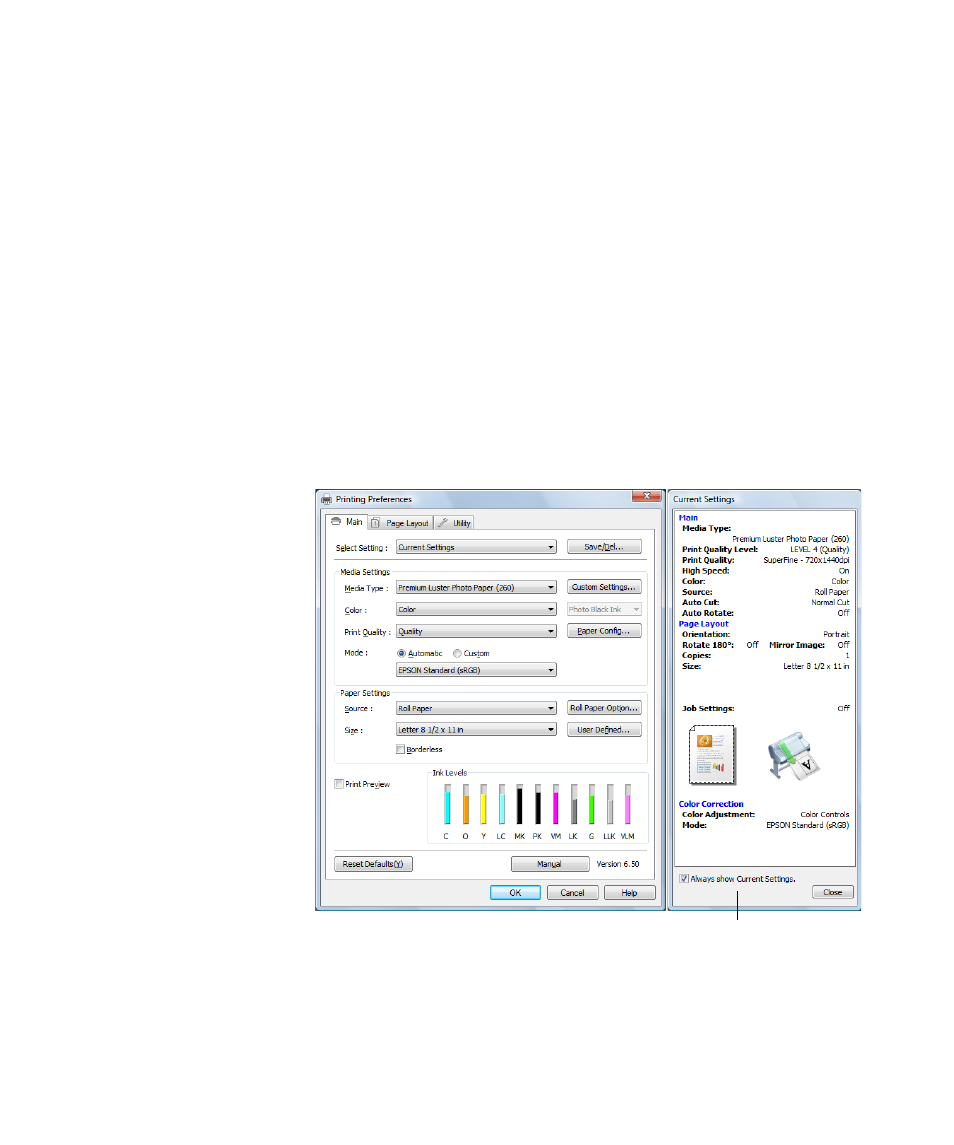
You see a window like the following:
Note: If you need more
information about print
options, you can click
the Help button on
any screen.
This box shows you the
current settings, but you
can’t change them from here
- Stylus Pro 7800 (11 pages)
- Stylus Pro 4000 (49 pages)
- Stylus Photo R300 (2 pages)
- Stylus Pro 7000 (147 pages)
- AcuLaser C3000 (316 pages)
- Stylus Pro 7900 (24 pages)
- Stylus Pro 4450 (21 pages)
- 1000 (272 pages)
- T034120 (4 pages)
- T580300 (4 pages)
- 300 (91 pages)
- B 510DN (190 pages)
- B 510DN (218 pages)
- Stylus NX510 (8 pages)
- Stylus Photo RX580 (95 pages)
- T549300 (4 pages)
- AculaserCX11NF (5 pages)
- B 500DN (168 pages)
- 480SXU (24 pages)
- 4500 (317 pages)
- STYLUS RX500 (99 pages)
- 2100 (13 pages)
- Stylus NX215 (2 pages)
- T098320 (4 pages)
- T041020 (4 pages)
- R210 (8 pages)
- All-In-One Stylus Photo RX600 (164 pages)
- 777I (53 pages)
- T033120 (4 pages)
- Stylus CX7000F (8 pages)
- 60 (113 pages)
- T034220 (4 pages)
- WorkForce 40 Series (36 pages)
- T054220 (4 pages)
- Stylus CX3200 (11 pages)
- Stylus CX7800 (18 pages)
- T060220 (4 pages)
- 2500 (180 pages)
- AcuLaser CX11N (32 pages)
- AcuLaser CX11N (4 pages)
- 2000P (16 pages)
- T606600 (4 pages)
- Stylus CX6000 (18 pages)
- FS-4000DN (2 pages)
- MSDS T544700 (4 pages)