
Epson STYLUS 7900 User Manual
Page 118
118
118
|
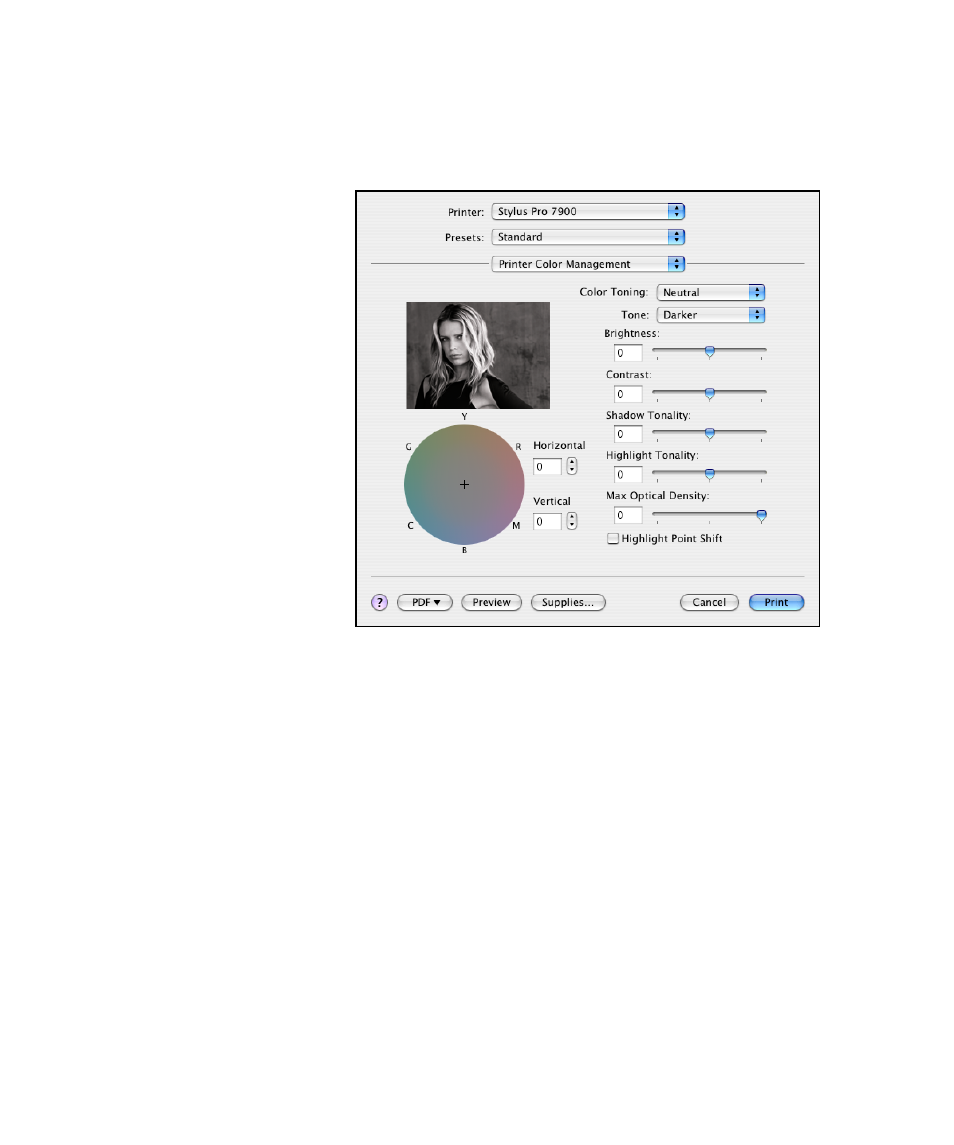
Printing With Epson Drivers for Macintosh
5. Select
Printer Color Management
from the drop-down menu. You see
this screen:
6. Choose the settings that are best for your photo.
•
Color Toning
allows you to add tone (hue) to your black and white
output. The default is
Neutral
, which will provide you with a
neutral tonal scale print. You can also choose other popular presets
such as
Cool
,
Warm
, and
Sepia
. Note that the presets affect the
target found in the tone color circle.
•
Tone
allows you to easily change the entire tonal scale of your black
and white output. While
Darker
is the default setting, you may see
better results if you choose
Dark
.
•
Brightness
adjusts the overall lightness and darkness of your image.
•
Contrast
adjusts the difference between the light and dark areas of
your image.
•
Shadow Tonality
and
Highlight Tonality
allow you to control
tonality only in the shadow or highlight areas of your image.
- Stylus Pro 7800 (11 pages)
- Stylus Pro 4000 (49 pages)
- Stylus Photo R300 (2 pages)
- Stylus Pro 7000 (147 pages)
- AcuLaser C3000 (316 pages)
- Stylus Pro 7900 (24 pages)
- Stylus Pro 4450 (21 pages)
- 1000 (272 pages)
- T034120 (4 pages)
- T580300 (4 pages)
- 300 (91 pages)
- B 510DN (190 pages)
- B 510DN (218 pages)
- Stylus NX510 (8 pages)
- Stylus Photo RX580 (95 pages)
- T549300 (4 pages)
- B 500DN (168 pages)
- AculaserCX11NF (5 pages)
- 480SXU (24 pages)
- 4500 (317 pages)
- STYLUS RX500 (99 pages)
- 2100 (13 pages)
- Stylus NX215 (2 pages)
- T098320 (4 pages)
- T041020 (4 pages)
- R210 (8 pages)
- All-In-One Stylus Photo RX600 (164 pages)
- 777I (53 pages)
- T033120 (4 pages)
- Stylus CX7000F (8 pages)
- 60 (113 pages)
- T034220 (4 pages)
- WorkForce 40 Series (36 pages)
- T054220 (4 pages)
- Stylus CX3200 (11 pages)
- Stylus CX7800 (18 pages)
- T060220 (4 pages)
- 2500 (180 pages)
- AcuLaser CX11N (4 pages)
- AcuLaser CX11N (32 pages)
- 2000P (16 pages)
- T606600 (4 pages)
- Stylus CX6000 (18 pages)
- FS-4000DN (2 pages)
- MSDS T544700 (4 pages)