
Attach the mode-conditioning patch cord, Port adapter cable connections – Cisco 7301 User Manual
Page 14
14
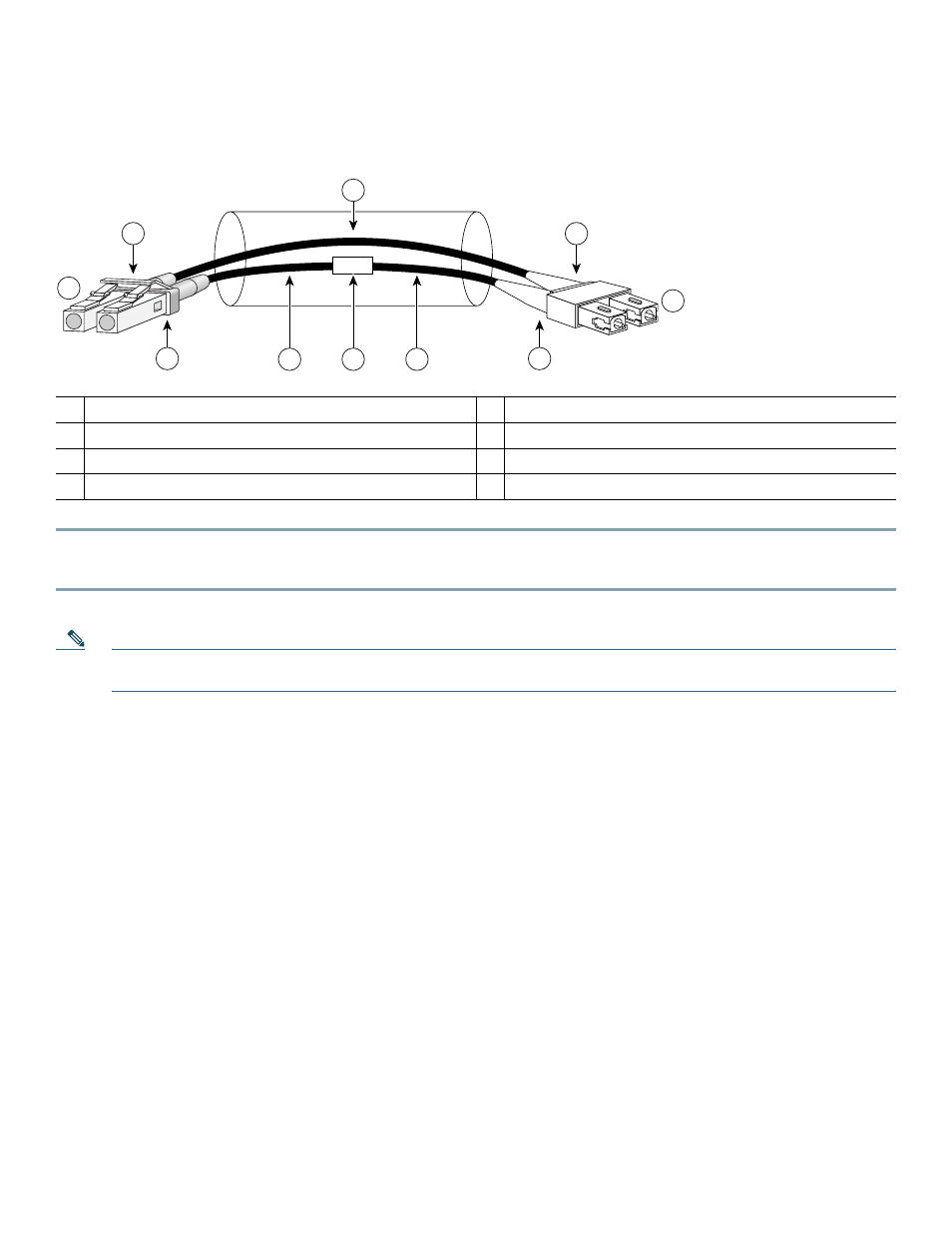
Attach the Mode-Conditioning Patch Cord
Figure 13
Attaching the Mode-Conditioning Patch Cord
Step 1
Attach the patch cord to the LC-type connector on the SFP GBIC modules (2).
Step 2
Attach the network ends of your patch cord to the appropriate 1000BASEX equipment in your building cable plant (9).
Note
Ensure that you connect the TX and RX ports on one end of the patch cord to the RX and TX ports (respectively) on
the other end. Connect TX to RX and RX to TX.
A mode-conditioning patch cord can be used with the
GLC-SX-MM
or GLC-LH-SM to allow reliable laser transmission
between the single-mode laser source on the SFP GBIC module and a multimode optical fiber cable.
Port Adapter Cable Connections
1
Gray color identifier
5
Single-mode bar
2
To GE interface
6
Offset
3
Blue color identifier
7
Beige color identifier
4
Multimode bar
8
To cable plant
/ /
/ /
/ /
TX
Offset
RX
84159
1
7
2
3
7
4
8
6
5
4
- ASA 5505 (1994 pages)
- OL-15491-01 (268 pages)
- WUSB600N (43 pages)
- 10000 (556 pages)
- 10000 (12 pages)
- 3825 (358 pages)
- WRV54G (101 pages)
- WUSB54GC (33 pages)
- 2600 Series (10 pages)
- DPQ2202 (38 pages)
- 1600 (13 pages)
- WRT320N (53 pages)
- 1701 (10 pages)
- 300 (16 pages)
- 3200 Series (60 pages)
- 2900 SERIES XL (138 pages)
- 4430 (12 pages)
- 1005 (6 pages)
- 3500 Series (8 pages)
- GigaStack WS-X3500-XL (58 pages)
- WIRELESS-G WRT54GP2 (112 pages)
- 1604 (22 pages)
- 3600 Series (18 pages)
- WIRELESS LAN CONTROLLER OL-17037-01 (80 pages)
- DPC3000 (36 pages)
- 3545 MCU (56 pages)
- WRT110 (48 pages)
- 7300-6T3 (54 pages)
- 10BASE-FL (40 pages)
- 340 (62 pages)
- 1700 (88 pages)
- 1700 (14 pages)
- 12000 (60 pages)
- 3600 (18 pages)
- 1800 Series (12 pages)
- 2000 (6 pages)
- ACE XML OL-13877-01 (12 pages)
- 10720 (26 pages)
- 10008 (38 pages)
- 10008 (48 pages)
- 1-PORT G.SHDSL 2600 (22 pages)
- XM Universal Gateways Cisco AS5400XM (100 pages)
- 1710 (12 pages)
- WRTP54G (114 pages)
- 7201 (4 pages)