
Pc 6410 – Acnodes PC 6410 User Manual
Page 28
14628 Central Blvd,
Chino, CA91710
tel:909.597.7588, fax:909.597.1939
© Copyright 2011 Acnodes, Inc.
All rights reserved. Product descrions
are subject to change without nomation,
please visit Acnodes’ web site at
PC 6410
10.2” Fanless Pa
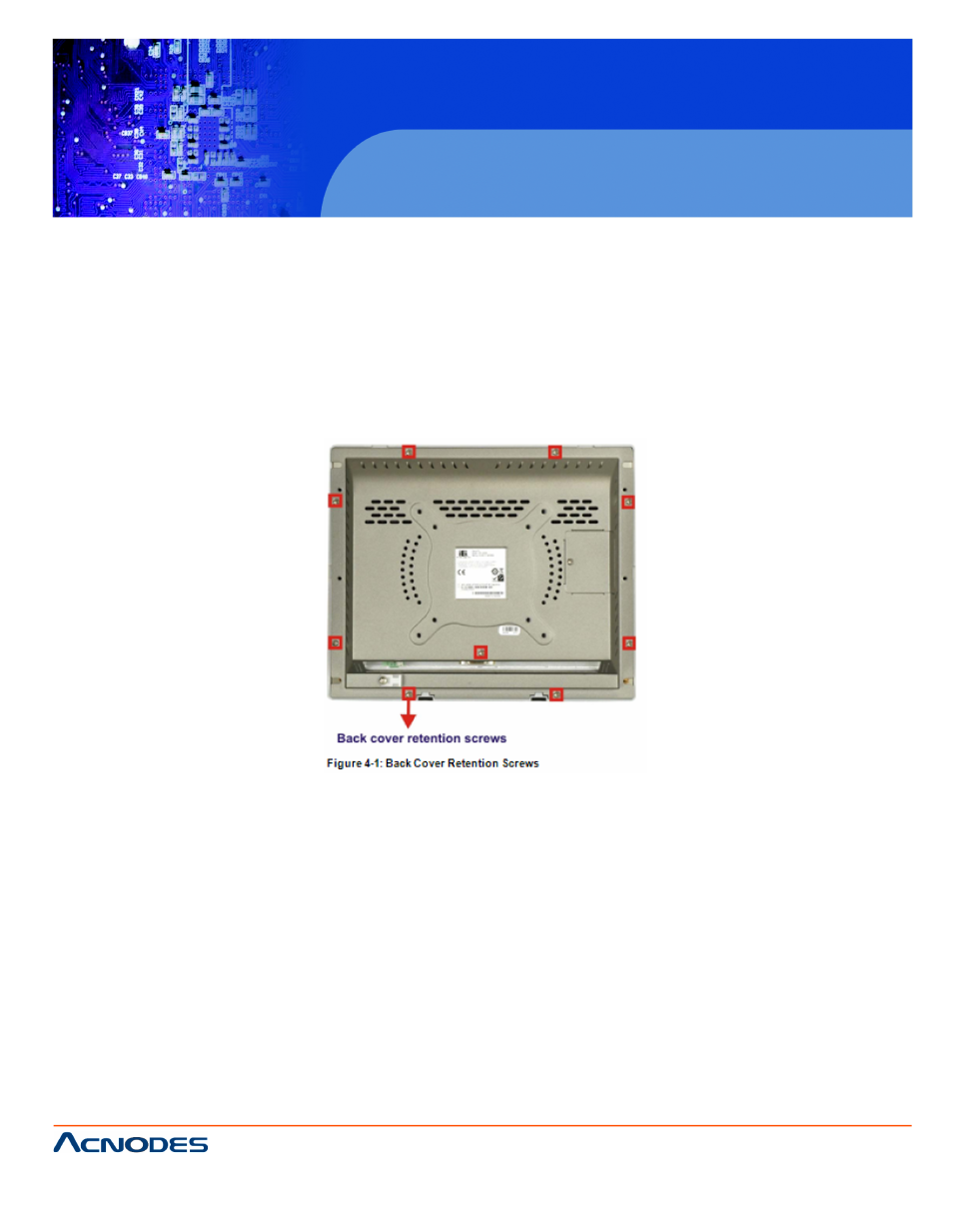
4.5 REMOVING THE REAR PANEL
To access the PC Series-N270 internally the rear panel must bemove
the rear panel, please follow the steps below.
Step 1: Place the PC Series-N270 face down on a flat surface.
Step 2: Remove the retention screws (Figure 4-1).
Step 3: Lift the cover off and pull down the cover a bit to make the
cover further more after removing the retention screws. More strd to
separate the cover from the chassis.
4.6 CF CARD INSTALLATION
The PC Series-N270 has one CF Type II slot inside the rear pa be
accessed without removing the back cover. To install the CF castruc-
tions below.
Step 1: Locate the CF slot cover. Remove the retention screw re 4-2).
- RMC 7182 (103 pages)
- PC 6170 (75 pages)
- PC6172 (66 pages)
- RMC 7132 (98 pages)
- RMC 7155 (5 pages)
- RMC 7150 (66 pages)
- PC 6152 (77 pages)
- PCH 5120 (82 pages)
- PC 8150 (72 pages)
- RMC 7130 (8 pages)
- RMC 7130 (99 pages)
- PC 8120 (51 pages)
- PC 8120 (7 pages)
- KD 6176 (3 pages)
- RMC 7155 (67 pages)
- FPC-8057 (57 pages)
- FPC 6084 (105 pages)
- FPC 7150 (80 pages)
- FES 6831 (50 pages)
- FES 5312 (117 pages)
- PCH 3982 (87 pages)
- PCH 7591 (99 pages)
- PC 5153 (97 pages)
- FPC 7919 (104 pages)
- FPC 5105 (47 pages)
- FPC 6120 (114 pages)
- FPC 7615 (88 pages)
- PCH 7791 (99 pages)
- FES 2213 (57 pages)
- FES 2236 (49 pages)
- PCH 7991 (99 pages)
- PC 6408 (98 pages)
- FPC 7617 (88 pages)
- FPC 1015 (13 pages)
- FES 7510 (107 pages)
- PCH 3598 (82 pages)
- FPC 7161 (40 pages)
- PC 6172 (48 pages)
- PC 8153 (46 pages)
- FES 8730 (71 pages)
- PC 5192 (104 pages)
- PCH 3991 (77 pages)
- FES 6911 (58 pages)
- FES 2215 (37 pages)
- PC 6412 (107 pages)