
Playback mode – Vivitar ViviCam 8400 User Manual
Page 29
28
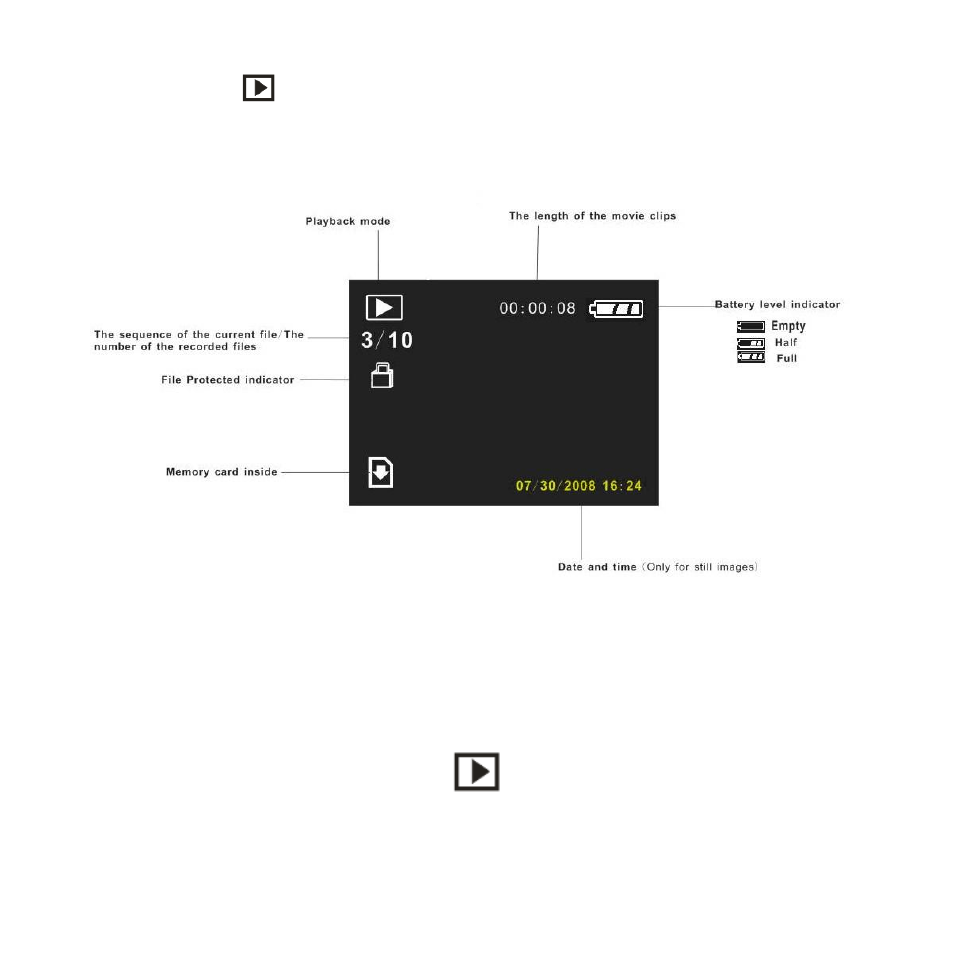
Playback Mode
Press the
Playback button on the camera in order to playback the media
captured with your camera. The playback screen will appear. You can playback
the photos and videos in your camera.
To view all the media on your camera:
1.
The last image taken with your camera will be the first image to appear on
the LCD when pressing the Playback button
2.
Press the Left/Right buttons to select the images you wish to view or
playback.
3.
Photos will appear with the
icon on the top left corner.
4.
Videos will appear with this icon as well as the time length of the video
appearing next to the battery icon on the top of the LCD.
5.
You can zoom into photos using the Zoom In button.
See also other documents in the category Vivitar Cameras:
- ViviCam V15 (41 pages)
- VIVICAM T030 (60 pages)
- VS17G (26 pages)
- V3625 (47 pages)
- ViviCam 2750 (24 pages)
- 3765 (55 pages)
- ViviCam 3705 (52 pages)
- Vivicam 3715 (47 pages)
- VIVICAM DVR510 (32 pages)
- VIVICAM X027 (63 pages)
- ViviCam 3345 (18 pages)
- VIVICAM T024 (54 pages)
- ViviCam 5018 (33 pages)
- VIVICAM 620HD (60 pages)
- VIVICAM 3200 (36 pages)
- Vivicam 2755 (22 pages)
- 3615 (65 pages)
- VIVICAM 8025 (52 pages)
- ViviCam T328 (62 pages)
- ViviCam 8324 (65 pages)
- ViviCam 5022 (29 pages)
- T327 (54 pages)
- VIVICAM 5015 (28 pages)
- Vivicam 3350B (29 pages)
- Dvr560 (48 pages)
- VIVICAM 7690 (48 pages)
- ViviCam 3730 (61 pages)
- VIVICAM 5118V2 (58 pages)
- vivtarr i7 (81 pages)
- ViviCam 8300s (85 pages)
- Vivicam T135 (64 pages)
- VIVICAM T532 (55 pages)
- VIVICAM F536 (61 pages)
- Vivicam 3735 (44 pages)
- ViviCam X327 (55 pages)
- V69379M (19 pages)
- ViviCam X028 (60 pages)
- VIVICAM 8690 (49 pages)
- VIVICAM 5028 (53 pages)
- VIVICAM X026 (66 pages)
- ViviCam S529 (56 pages)
- DVR 830XHD (84 pages)
- ViviCam 3340 (28 pages)
- VIVICAM 8027 (56 pages)