
Abocom EFM560 User Manual
Page 7
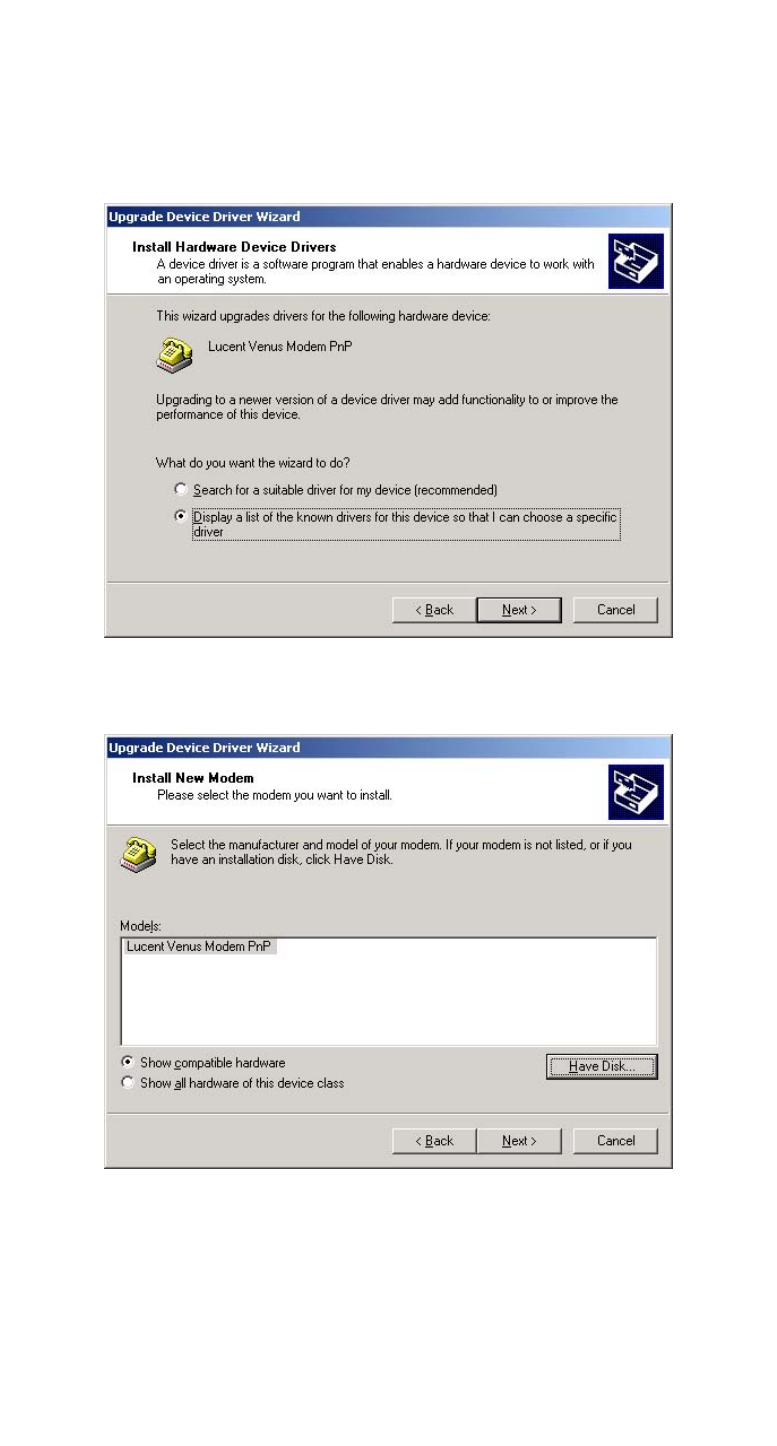
11.Select Display a list of the
known drivers for this device so
that I can choose a specific
driver and click Next.
12.Highlight Lucent Venus Modem PnP
and click the Have Disk button.
13.Load the floppy disk or compact
disc whichever contains the
device driver and type the drive
path. Click OK.
- 6 -
See also other documents in the category Abocom Hardware:
- FM560MX (1 page)
- WU5204 (2 pages)
- WR201 (4 pages)
- UCM56CR (16 pages)
- WB1500H (1 page)
- FVR206 (10 pages)
- RE450MX (13 pages)
- X-Disk (1 page)
- Powerline Filter for PLC Communication PLF100 (2 pages)
- UTA128 (1 page)
- FSM612 (1 page)
- WUE1500 (20 pages)
- Internal Fax Modem 56K (19 pages)
- FE2000VX (11 pages)
- WMG2400 (3 pages)
- Wireless USB Adapter WUB1500 (1 page)
- WAP404 (2 pages)
- M73-APO07-300 (2 pages)
- UBT2K1H (2 pages)
- M73-APO0A-010 (15 pages)
- EFM56CC (1 page)
- FE1000SX (1 page)
- CWB1000 (19 pages)
- HomePlug 1.0 Turbo Ethernet Adapter PLE0085 (2 pages)
- UBT1000H (3 pages)
- CAS2047 (1 page)
- GFM560 (14 pages)
- FSM610 (1 page)
- UR3060E (2 pages)
- ECR500 (2 pages)
- FE2500MX (1 page)
- WBA580 (1 page)
- MC-56SVV (1 page)
- UBT3K (2 pages)
- PCMCIA (8 pages)
- 10/100M Fast Ethernet M73-APO08-420 (20 pages)
- AP900 (2 pages)
- UHL2000 (1 page)
- TA128 (1 page)
- VDSL to Ethernet Bridge VE1000 (1 page)
- ISDN TA PCI Card PI128 (1 page)
- Bluetooth Wireless USB Adapter UBT1000 (1 page)
- WB1500SH (1 page)
- ARM904 (3 pages)
- IAM800 (1 page)