
Pc 6412, Chapter 6 bios options – Acnodes PC 6412 User Manual
Page 52
14628 Central Blvd,
Chino, CA91710
tel:909.597.7588, fax:909.597.1939
© Copyright 2011 Acnodes, Inc.
All rights reserved. Product descrions
are subject to change without nomation,
please visit Acnodes’ web site at
PC 6412
12.1” Fanless Pa
6.1 Introduction
The BIOS is programmed onto the BIOS chip. The BIOS setup
changes to certain system settings. This chapter outlines the opt
changed.
6.1.1 Starting Setup
The AMI BIOS is activated when the computer is turned on. Thecan be
activated in one of two ways.
1. Press the DELETE key as soon as the system is turned on
2. Press the DELETE key when the "Press Del to enter SETUears on
the screen. 0.
If the message disappears before the DELETE key is pressed, uter
and try again.
6.1.2 Using Setup
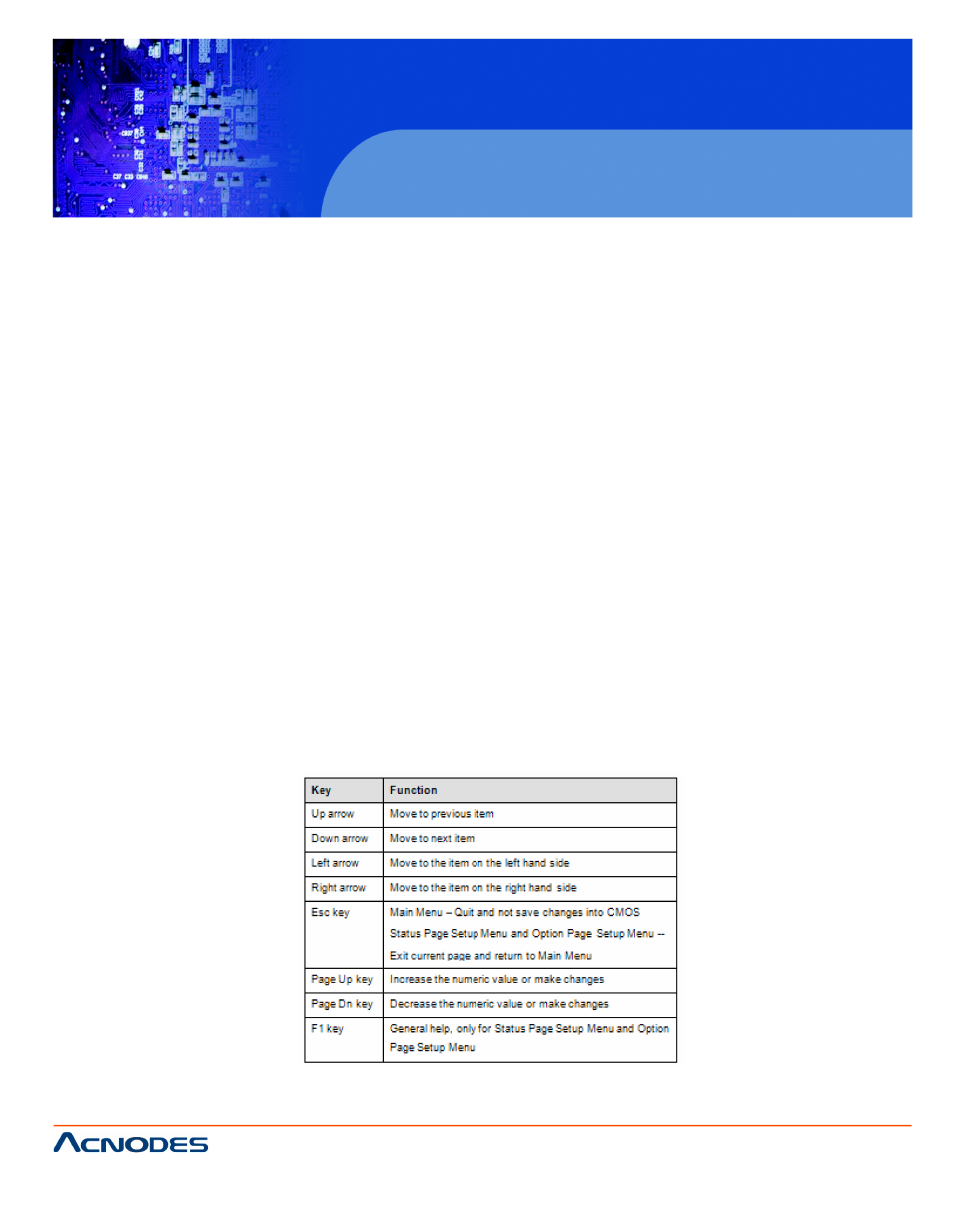
Use the arrow keys to highlight items, press ENTER to select, and
PAGEDOWN keys to change entries, press F1 for help and preNaviga-
tion keys are shown below.
CHAPTER 6 BIOS OPTIONS
- RMC 7182 (103 pages)
- PC 6170 (75 pages)
- PC6172 (66 pages)
- RMC 7132 (98 pages)
- RMC 7155 (5 pages)
- RMC 7150 (66 pages)
- PC 6152 (77 pages)
- PCH 5120 (82 pages)
- PC 8150 (72 pages)
- RMC 7130 (8 pages)
- RMC 7130 (99 pages)
- PC 8120 (51 pages)
- PC 8120 (7 pages)
- KD 6176 (3 pages)
- RMC 7155 (67 pages)
- FPC-8057 (57 pages)
- FPC 6084 (105 pages)
- FPC 7150 (80 pages)
- FES 6831 (50 pages)
- FES 5312 (117 pages)
- PCH 3982 (87 pages)
- PCH 7591 (99 pages)
- PC 5153 (97 pages)
- FPC 7919 (104 pages)
- FPC 5105 (47 pages)
- FPC 6120 (114 pages)
- FPC 7615 (88 pages)
- PCH 7791 (99 pages)
- FES 2213 (57 pages)
- FES 2236 (49 pages)
- PCH 7991 (99 pages)
- PC 6408 (98 pages)
- FPC 7617 (88 pages)
- FPC 1015 (13 pages)
- FES 7510 (107 pages)
- PCH 3598 (82 pages)
- FPC 7161 (40 pages)
- PC 6172 (48 pages)
- PC 8153 (46 pages)
- FES 8730 (71 pages)
- PC 5192 (104 pages)
- PCH 3991 (77 pages)
- FES 6911 (58 pages)
- FES 2215 (37 pages)