
AirLive POE-100CAM User Manual
Page 10
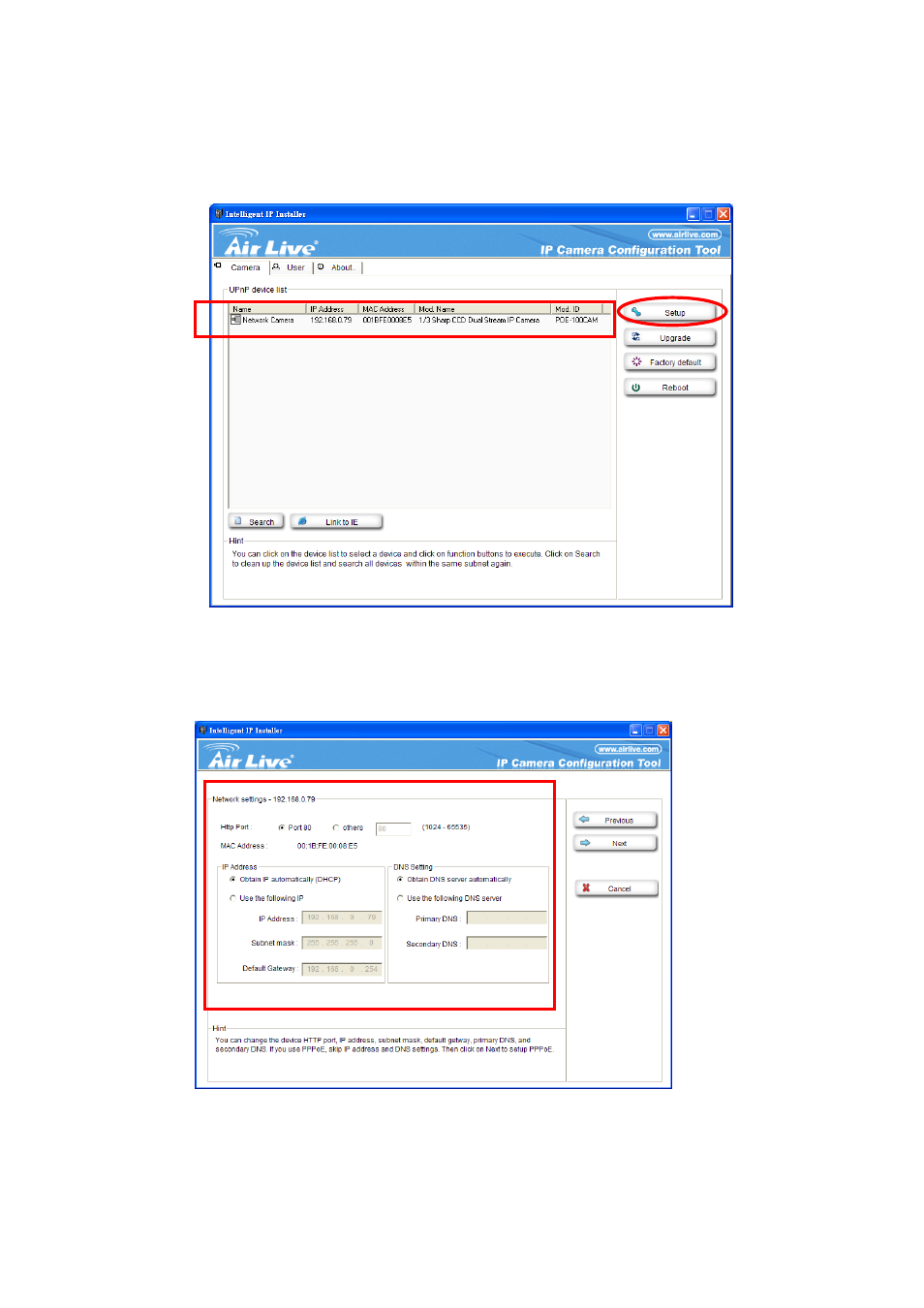
6. If the IP is not in your IP segment, select the founded IP Camera and click “Setup”
Note that the text color of the listed IP Camera is red if it is not in same the IP segment with your PC.
7. Follows setup instruction to change the IP address of the IP Camera.
Change IP Here
8. At the end of the setup instruction, the IP Camera Reboots
9. Click the Search button to search again
AirLive POE-100CAM User’s Manual 5
10. Click “Link to IE” to proceed.
See also other documents in the category AirLive Camcorders:
- BC-5010 (82 pages)
- BC-5010-IVS (67 pages)
- BU-2015 (46 pages)
- BU-3025 (74 pages)
- BU-720 (59 pages)
- CamPro Express 64 (68 pages)
- CamPro HD (120 pages)
- CU-720PIR (97 pages)
- CW-720 (99 pages)
- DM-720 (61 pages)
- FE-200CU (71 pages)
- FE-200DM (74 pages)
- FE-200VD (72 pages)
- IP-150CAM (76 pages)
- IP-200PHD (96 pages)
- IP-200PHD-24 (97 pages)
- MD-3025 (64 pages)
- MD-720 (68 pages)
- OD-2050HD (87 pages)
- OD-2060HD (104 pages)
- OD-300CAM (85 pages)
- OD-325HD (81 pages)
- OD-600HD (80 pages)
- POE-100CAMv2 (138 pages)
- POE-100HD (89 pages)
- POE-200CAMv2 (117 pages)
- PoE-2600HD (112 pages)
- POE-280HD (99 pages)
- POE-5010HD (77 pages)
- WL-1000CAM (69 pages)
- WL-1200CAM (88 pages)
- WL-2000CAM (43 pages)
- WL-2600CAM (90 pages)
- WL-350HD (98 pages)
- WL-5420CAM (113 pages)
- WL-5460CAM (110 pages)
- WN-200HD (103 pages)