
Infotainment system 6-63 – CHEVROLET 2010 Equinox User Manual
Page 205
Infotainment System
6-63
5. The Phone menu will be
displayed with the name of the
phone paired.
Making a Call
Press the
5
on the infotainment
system to access the Phone menu.
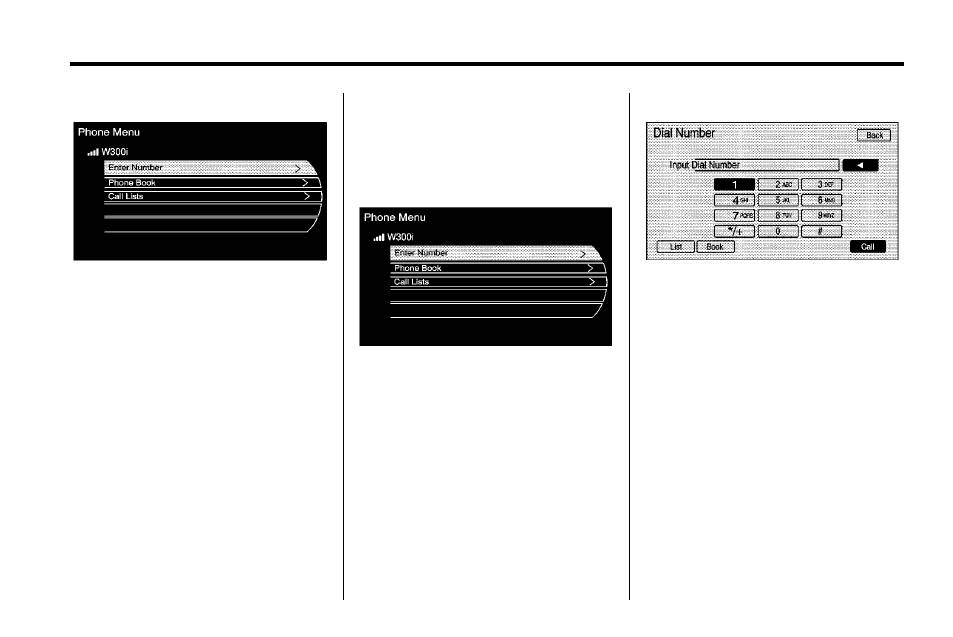
Enter Number
Use this option to enter a phone
number and make a call. To do this:
1. Press the Enter Number
selection. A dial pad displays on
the navigation screen.
2. Enter the desired phone number
by touching the appropriate
buttons on the screen or using
the rotary knob.
3. Press the Call button to make
the call.
Accepting or Declining an
Incoming Call
When an incoming call is received,
the infotainment system mutes any
audio being played and sounds a
ring tone.
See also other documents in the category CHEVROLET Cars:
- Suburban 2007 (634 pages)
- SSR (16 pages)
- Optra Magnum (10 pages)
- 1999 Corvette (376 pages)
- Silverado 1500 (32 pages)
- 170 (88 pages)
- 1999 Cavalier (368 pages)
- Roadtrek (78 pages)
- S-10 (422 pages)
- Silverado 2500HD Classic (8 pages)
- 2013 Camaro (414 pages)
- 2012 Traverse (450 pages)
- 2012 Tahoe (544 pages)
- 2012 Silverado (608 pages)
- 2012 Malibu (376 pages)
- 2012 Impala (360 pages)
- 2012 Express (430 pages)
- 2012 Equinox (428 pages)
- 2012 Corvette (432 pages)
- 2012 Colorado (408 pages)
- 2012 Camaro (444 pages)
- 2012 Avalanche (488 pages)
- 2011 Traverse (452 pages)
- 2011 Suburban (522 pages)
- 2011 Tahoe (98 pages)
- 2011 Malibu (390 pages)
- 2011 Silverado (80 pages)
- 2011 HHR (444 pages)
- 2011 Express (424 pages)
- 2011 Equinox (416 pages)
- 2011 Corvette (436 pages)
- 2011 Colorado (394 pages)
- 2011 Camaro (414 pages)
- 2011 Aveo (328 pages)
- 2011 Avalanche (508 pages)
- 2010 Tahoe (614 pages)
- 2010 Silverado (626 pages)
- 2010 Impala (422 pages)
- 2010 HHR (464 pages)
- 2010 Express (440 pages)
- 2010 Camaro (372 pages)
- 2010 Avalanche (508 pages)
- 2009 Tahoe (578 pages)
- 2009 Silverado (74 pages)