
Apple Macintosh PowerBook 150 User Manual
Page 88
3
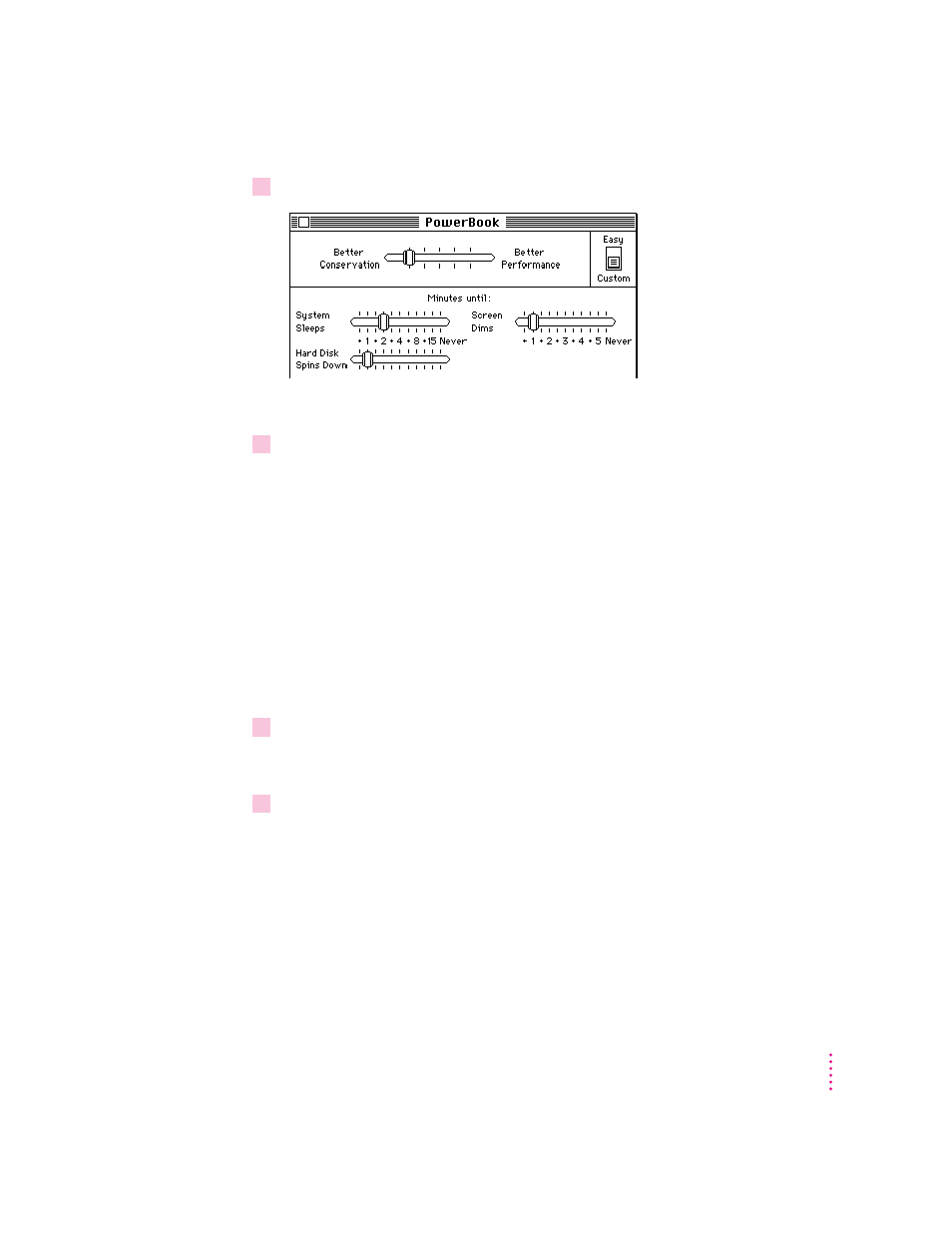
Drag the sliders to choose the settings you want.
The Battery Conservation slider reflects the changes you make.
4
Close the PowerBook control panel.
Processor cycling
If the computer is not doing anything for a few seconds, it turns off its
microprocessor. The microprocessor comes back on the instant you resume
work. This feature is called processor cycling. Processor cycling conserves
battery power. Your computer automatically comes with processor cycling
turned on, and it is highly recommended that you work with processor
cycling on.
In a few cases, processor cycling can cause programs to slow down. If a
program performs very slowly, you can turn off processor cycling temporarily.
Follow these steps:
1
Choose Control Panels from the Apple (
K
) menu and open the PowerBook control panel.
(Or use the Power Settings module in the Control Strip to open the PowerBook control
panel.)
2
Slide the switch to Custom.
79
Power Management
- iMac G5 (2005) (96 pages)
- iMac G5 (96 pages)
- iMac (6 pages)
- iMac (76 pages)
- Mac Pro Computer (92 pages)
- Mac Pro (88 pages)
- Mac mini (96 pages)
- Mac mini (original) (106 pages)
- eMac (10 pages)
- eMac (80 pages)
- Power Mac G5 (Late 2005) (33 pages)
- Power Mac G5 (Early 2005) (120 pages)
- iMac G3 (38 pages)
- Intel-based iMac (Mid 2007) (76 pages)
- iMac G5 (iSight) (96 pages)
- Mac mini (Early 2006) (96 pages)
- Power Mac G5 (112 pages)
- Power Mac G5 (36 pages)
- Mac mini (Intel-based; Mid 2007) (72 pages)
- PowerPC G5 (15 pages)
- Macintosh Performa 578 (161 pages)
- Xserve G5 (94 pages)
- Xserve G5 (96 pages)
- Xserve (Hard Drive Replacement) (3 pages)
- Workgroup Server 8550 (121 pages)
- Workgroup Server 8550 (163 pages)
- iMac computer (120 pages)
- LC 560 (2 pages)
- Mac G4 (Video Card Replacement) (6 pages)
- Mac 6500/275 (232 pages)
- Mac Performa 5300 CD series (Tech informatiom) (8 pages)
- Power Macintosh 6500 Series (260 pages)
- eMac (Stand Installation) (13 pages)
- Remote Desktop (203 pages)
- Remote Desktop (16 pages)
- Remote Desktop (116 pages)
- MAC PRO (Hard Drive Replacement) (5 pages)
- iMac G5, 20-inch (314 pages)
- iMac G5, 20-inch (22 pages)
- Power Macintosh 7100/66AV (132 pages)
- Xserve Late 2006/Early 2008 (PCI Expansion Card Replacement) (6 pages)
- Xserve (Blower Replacement) (5 pages)
- Xserve RAID (Locking Switch Replacement) (6 pages)
- Macintosh Performa 640 Series (DOS Compatible) (196 pages)
- Mac 9600 (237 pages)