
Xcvkl, Xcvlk, Dubbing from dvd to vcr – Samsung DVD-VR375A-XAA User Manual
Page 67: Dubbing from vcr to dvd, Direct dubbing dvd to video, Direct dubbing vcr to dvd, English
English
_67
●
RECORDING
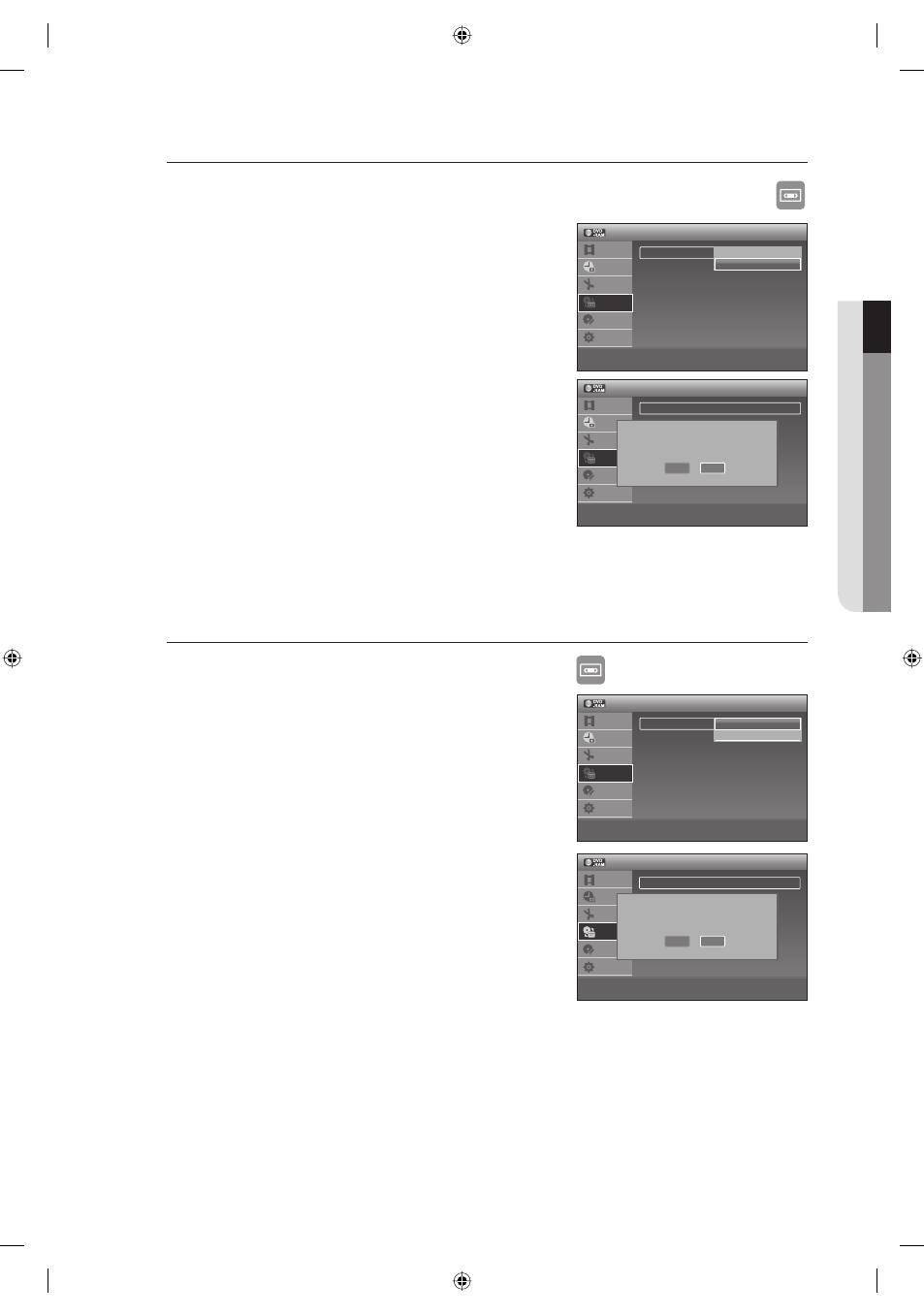
Dubbing from DVD to VCR
XCVKL
With the unit in Stop mode, press the MENU button.
Press the
▲▼ buttons to select Dubbing, then press the ENTER button.
Press the
▲▼ buttons to select Simple Dubbing, then press the
ENTER button.
Press the
▲▼ buttons to select DVD ➞ VCR, then press the
ENTER
button.
The Message "Do you want to copy DVD contents to Video?" will
be displayed.
Press the
◄► buttons to select Yes, then press the ENTER button.
Direct dubbing DVD to VIDEO
Insert a DVD disc you want to dubbing.
Insert a VHS tape.
Press the VCR dubbing button on front panel or remote control. (TO VCR)
To stop recording, press the STOP button.
Dubbing function is not allowed in progressive scan mode.
You can record VCR in a state of HDMI connected. But you cannot dubbing from the DVD to VCR.
Dubbing from VCR to DVD
XCVLK
With the unit in Stop mode, press the MENU button in stop mode.
Press the
▲▼ buttons to select Dubbing, then press the ENTER button.
Press the
▲▼ buttons to select Simple Dubbing, then press the
ENTER button.
Press the
▲▼ buttons to select VCR ➞ DVD, then press the
ENTER button.
The Message "Do you want to copy video contents to DVD?" will
be displayed.
Press the
◄► buttons to select Yes, then press the ENTER
button.
The VCR will fast forward, searching for a start position and then
automatically dubbing starts.
The Start and End points may not match up exactly.
Direct dubbing VCR to DVD
Insert the VHS tape you want to dub.
Insert a Recordable DVD disc.
Press DVD dubbing button on front panel or remote control. (TO DVD)
To stop recording press the STOP button.
1.
2.
3.
4.
5.
•
•
•
•
M
1.
2.
3.
4.
5.
6.
M
•
•
•
•
Simple Dubbing
DV/D8 Dubbing
12:00 AM
Dubbing
Title List
Timer
Edit
Dubbing
Disc
Setting
Setup
>
Move
sEnter
rReturn
eExit
Do you want to copy DVD contents to Video?
Yes
No
12:00 AM
Dubbing
Title List
Timer
Edit
Dubbing
Disc
Setting
Setup
>
Move
sEnter
rReturn
eExit
Simple Dubbing
DV/D8 Dubbing
Do you want to copy video contents to DVD?
Yes
No
Simple Dubbing
DV/D8 Dubbing
12:00 AM
Dubbing
Title List
Timer
Edit
Dubbing
Disc
Setting
Setup
>
Move
sEnter
rReturn
eExit
VCR -> DVD
DVD -> VCR
Simple Dubbing
DV/D8 Dubbing
12:00 AM
Dubbing
Title List
Timer
Edit
Dubbing
Disc
Setting
Setup
>
Move
sEnter
rReturn
eExit
VCR -> DVD
DVD -> VCR
01613A-03-VR375-XAA-ENG.indb 67
01613A-03-VR375-XAA-ENG.indb 67
2008-06-11 오후 2:18:58
2008-06-11 오후 2:18:58