
LG LGV500 User Manual
Page 67
65
NOTE:
Please use a fingertip while using the QuickMemo. Do not use your
fingernail.
Using the QuickMemo options
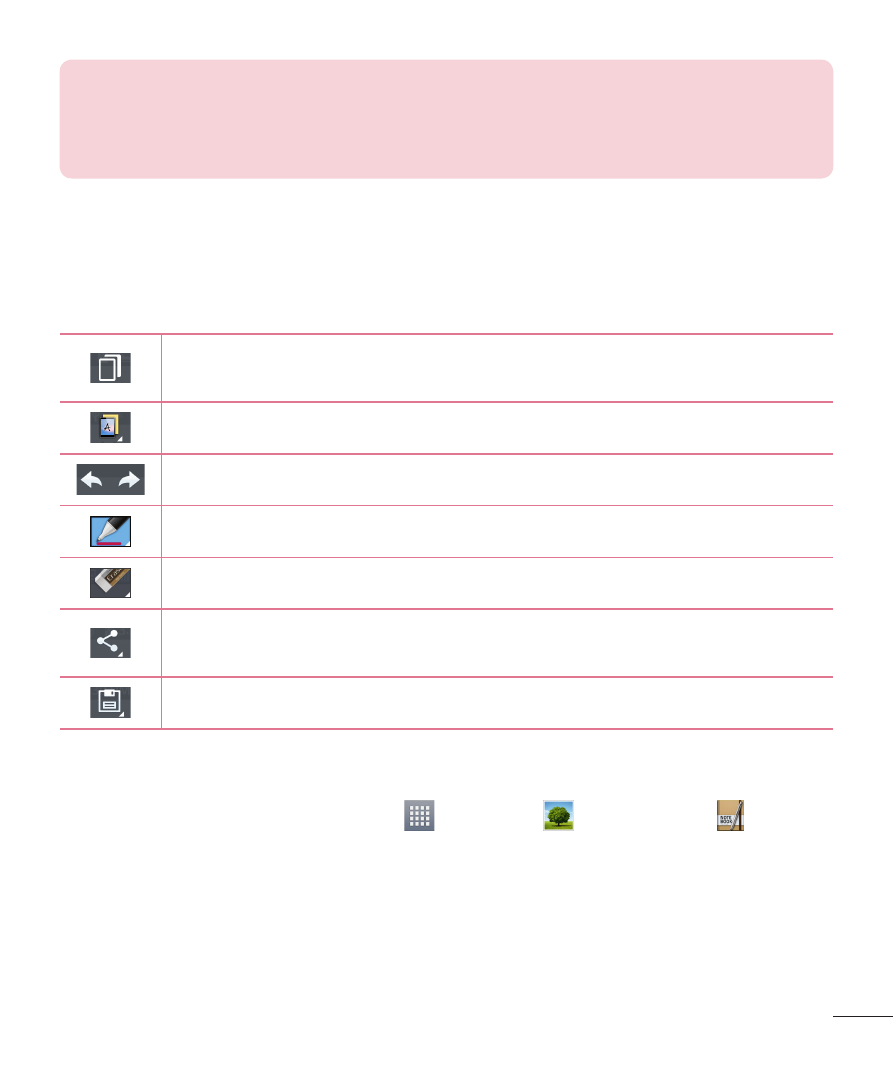
The following options are available in the QuickMemo toolbar at the top of
the screen.
Touch to keep the current memo on the screen and use the
tablet simultaneously.
Allows you to choose the type of background you want to use.
Allows you to undo and redo previous actions.
Selects the pen type and color and the cropping tool.
Erases edits you've made to the memo.
Touch to send your memo to others or share it via social
networking services.
Saves the memo in the
Notebook or Gallery.
Viewing the saved QuickMemo
From the Home screen, tap
Apps
>
Gallery
or
Notebook and
select the
QuickMemo album.
See also other documents in the category LG Mobile Phones:
- Octane VN530 (345 pages)
- Octane VN530 (166 pages)
- C2500 (73 pages)
- C3320 (76 pages)
- 500 (85 pages)
- C1100 (90 pages)
- 600 (86 pages)
- B2100 (79 pages)
- C2200 (52 pages)
- -TM510 (47 pages)
- -DM110 (40 pages)
- 200 (54 pages)
- 8560 (2 pages)
- CHOCOLATE MCDD0012301 (12 pages)
- AX245 (200 pages)
- CU500 (218 pages)
- CU500 (10 pages)
- CU500 (16 pages)
- 260 (240 pages)
- 1500 (2 pages)
- 1500 (196 pages)
- AX260 (115 pages)
- LG300G (226 pages)
- Apex (80 pages)
- Cosmos (8 pages)
- VN250 (141 pages)
- A7110 (8 pages)
- A7110 (262 pages)
- 3280 (94 pages)
- BLUETOOTH QDID B013918 KP199 (226 pages)
- Bliss -UX700W (143 pages)
- GT950 (149 pages)
- Wine (2 pages)
- ELLIPSE 9250 (169 pages)
- C1300 (134 pages)
- 355 (102 pages)
- LGVX9200M (317 pages)
- Ally VS740 (2 pages)
- GR500R (146 pages)
- 150 (76 pages)
- 620G (2 pages)
- BL20 (48 pages)
- -RD2630 (68 pages)
- DOUBLEPLAY MFL67441301 (196 pages)
- 420G (2 pages)