
Using the advanced settings – LG LGV500 User Manual
Page 54
52
TIP! When recording a video, place two fingers on the screen and pinch
to use the Zoom function.
NOTE: Make sure that the microphone is not blocked when recording a
video or audio clip.
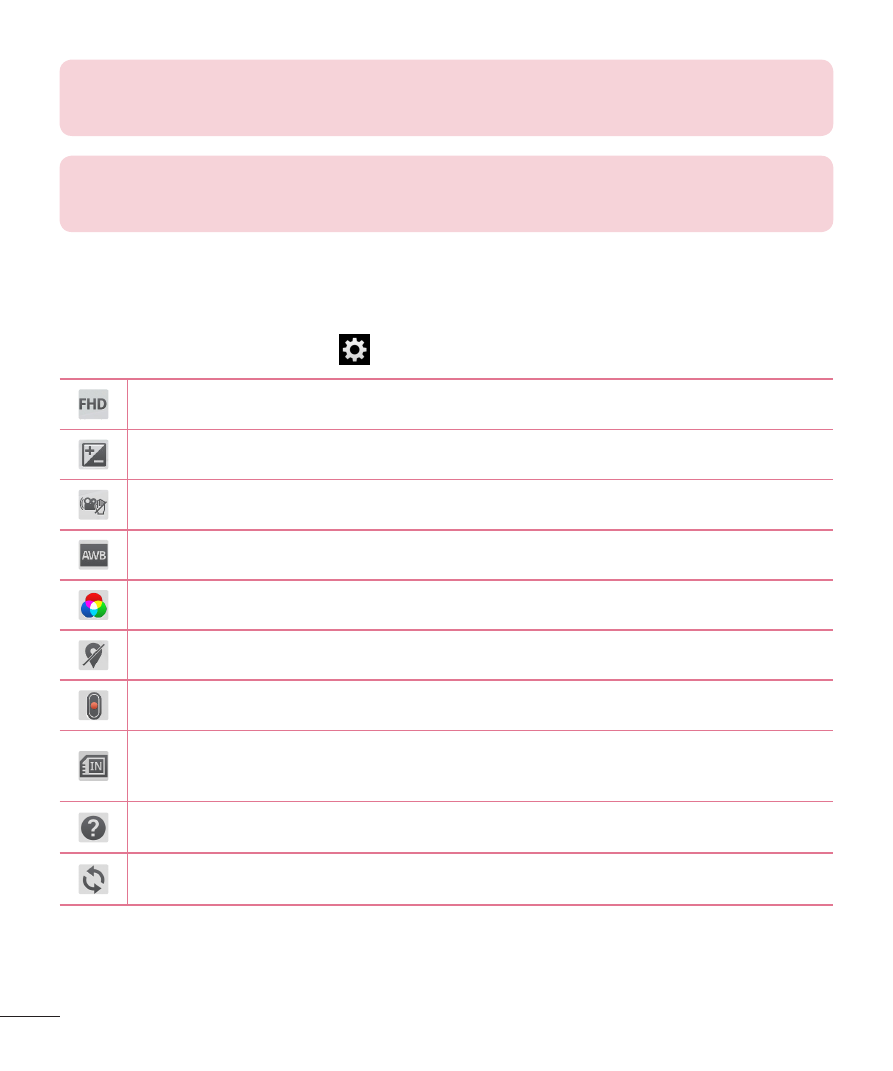
Using the advanced settings
Using the viewfinder, touch
to open all the advanced options.
Tap to set the size (in pixels) of the video you are recording.
Defines and controls the amount of sunlight entering the video.
Prevents shaking while recording to get high video quality.
Improves color quality in various lighting conditions.
Choose a color tone to use for your new view.
Activate this to use your tablet's location-based services.
Set to use the Volume Key for recording video or zooming.
This sets the location where you want to save your videos. Choose
from Internal memory and SD card.
Opens the help guide to know how a function operates.
Restores all camera default settings.
- Octane VN530 (345 pages)
- Octane VN530 (166 pages)
- C2500 (73 pages)
- C3320 (76 pages)
- 500 (85 pages)
- C1100 (90 pages)
- 600 (86 pages)
- B2100 (79 pages)
- C2200 (52 pages)
- -TM510 (47 pages)
- -DM110 (40 pages)
- 200 (54 pages)
- 8560 (2 pages)
- CHOCOLATE MCDD0012301 (12 pages)
- AX245 (200 pages)
- CU500 (10 pages)
- CU500 (16 pages)
- CU500 (218 pages)
- 260 (240 pages)
- 1500 (196 pages)
- 1500 (2 pages)
- AX260 (115 pages)
- LG300G (226 pages)
- Apex (80 pages)
- Cosmos (8 pages)
- VN250 (141 pages)
- A7110 (8 pages)
- A7110 (262 pages)
- 3280 (94 pages)
- BLUETOOTH QDID B013918 KP199 (226 pages)
- Bliss -UX700W (143 pages)
- GT950 (149 pages)
- Wine (2 pages)
- ELLIPSE 9250 (169 pages)
- C1300 (134 pages)
- 355 (102 pages)
- LGVX9200M (317 pages)
- Ally VS740 (2 pages)
- GR500R (146 pages)
- 150 (76 pages)
- 620G (2 pages)
- BL20 (48 pages)
- -RD2630 (68 pages)
- DOUBLEPLAY MFL67441301 (196 pages)
- 420G (2 pages)