
Video camera, Getting to know the viewfinder – LG LGV500 User Manual
Page 53
51
To open the video camera, tap
Camera
on the Home screen, then tap
the
Video mode icon (on the viewfinder) to switch to video mode.
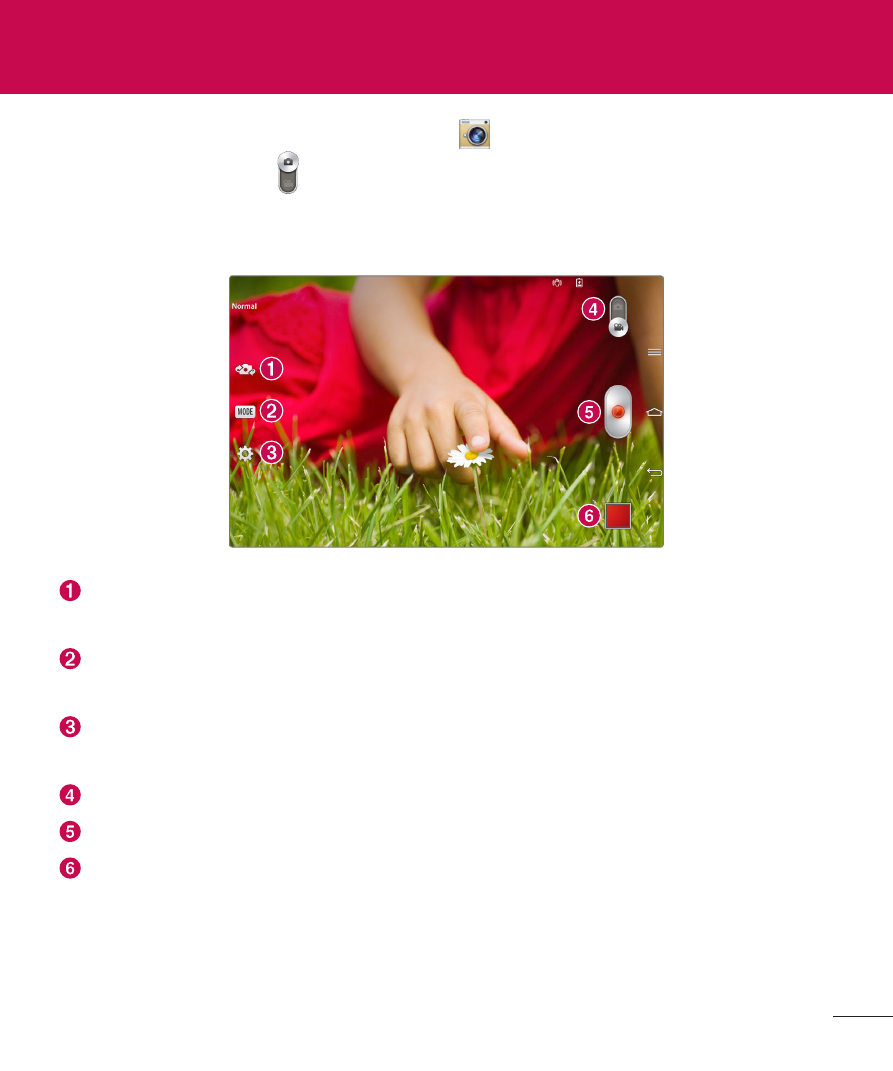
Getting to know the viewfinder
Swap camera – Switch between the back-facing camera lens and the
front–facing camera lens.
Record Mode – Allows you to choose a record mode to define how the
video will be recorded.
Settings – Touch this icon to open the settings menu. See Using the
advanced settings on the following page.
Camera mode – Touch and slide up this icon to switch to camera mode.
Record – Touch to start recording a video.
Gallery – Touch to view the last video you recorded. This enables you to
access your Gallery and view your saved videos while in video mode.
Video camera
See also other documents in the category LG Mobile Phones:
- Octane VN530 (345 pages)
- Octane VN530 (166 pages)
- C2500 (73 pages)
- C3320 (76 pages)
- 500 (85 pages)
- C1100 (90 pages)
- 600 (86 pages)
- B2100 (79 pages)
- C2200 (52 pages)
- -TM510 (47 pages)
- -DM110 (40 pages)
- 200 (54 pages)
- 8560 (2 pages)
- CHOCOLATE MCDD0012301 (12 pages)
- AX245 (200 pages)
- CU500 (10 pages)
- CU500 (16 pages)
- CU500 (218 pages)
- 260 (240 pages)
- 1500 (196 pages)
- 1500 (2 pages)
- AX260 (115 pages)
- LG300G (226 pages)
- Apex (80 pages)
- Cosmos (8 pages)
- VN250 (141 pages)
- A7110 (8 pages)
- A7110 (262 pages)
- 3280 (94 pages)
- BLUETOOTH QDID B013918 KP199 (226 pages)
- Bliss -UX700W (143 pages)
- GT950 (149 pages)
- Wine (2 pages)
- ELLIPSE 9250 (169 pages)
- C1300 (134 pages)
- 355 (102 pages)
- LGVX9200M (317 pages)
- Ally VS740 (2 pages)
- GR500R (146 pages)
- 150 (76 pages)
- 620G (2 pages)
- BL20 (48 pages)
- -RD2630 (68 pages)
- DOUBLEPLAY MFL67441301 (196 pages)
- 420G (2 pages)