
Colored hot keys (cont.) – Asus W2W User Manual
Page 31
31
Getting Started
3
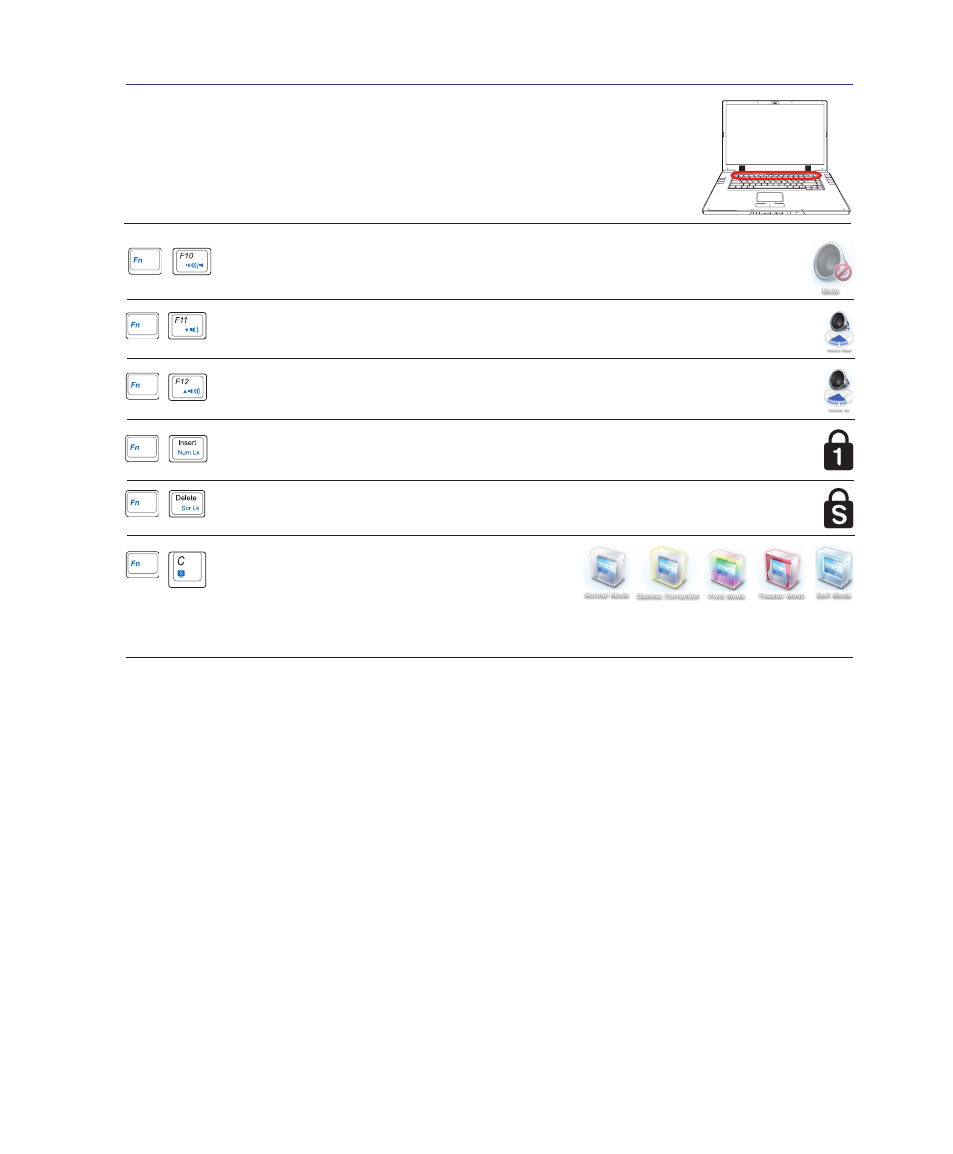
Colored Hot Keys (cont.)
Scr Lk (Del): Toggles the “Scroll Lock” ON and OFF. Allows you to use a larger
portion of the keyboard for cell navigation.
Num Lk (Ins): Toggles the numeric keypad (number lock) ON and OFF. Allows you
to use a larger portion of the keyboard for number entering.
Speaker Up Icon (F12):
Increases the speaker volume (only in Windows OS)
Fn+C: Toggles “Splendid Video Intelligent Technol-
ogy” function ON and OFF. This allows switching
between different display color enhancement modes
in order to improve contrast, brightness, skin tone, and color saturation for red, green, and
blue independently. You can see the current mode through the on-screen display (OSD).
Speaker Down Icon (F11):
Decreases the speaker volume (only in Windows OS)
Speaker Icons (F10):
Toggles the speakers ON and OFF (only in Windows OS)
- Eee PC 1003HAG (60 pages)
- G51Jx (118 pages)
- K50Ij(BestBuy) (78 pages)
- K50Ij(BestBuy) (24 pages)
- E5368 (114 pages)
- PL80JT (30 pages)
- K40AC (24 pages)
- G51J (114 pages)
- W5Ae (134 pages)
- W5Ae (70 pages)
- UX30S (26 pages)
- BX31E (100 pages)
- PRO33JC (26 pages)
- U30Jc (104 pages)
- W5 (7 pages)
- Eee PC T101MT (68 pages)
- U81A (88 pages)
- U81A (28 pages)
- Transformer Pad TF300TL (6 pages)
- Transformer Pad TF300T (90 pages)
- Transformer Pad TF300T (2 pages)
- K40AE (108 pages)
- A8He (71 pages)
- A8He (71 pages)
- A8He (71 pages)
- G72gx (28 pages)
- PRO7 (32 pages)
- EB1501 (46 pages)
- EB1501 (46 pages)
- EB1007 (179 pages)
- EB1007 (181 pages)
- EB1007 (109 pages)
- EB1007 (145 pages)
- EB1007 (183 pages)
- EB1007 (102 pages)
- EB1021 (40 pages)
- EB1012 (325 pages)
- EB1012 (95 pages)
- EB1012 (231 pages)
- EB1012 (185 pages)
- EB1012 (130 pages)
- EB1012 (1 page)
- Eee PC 1015CX (66 pages)
- Eee PC X101H (62 pages)
- Eee PC X101H (50 pages)