
Roberts Radio R876 User Manual
Page 39
If you need any further advice, please call our Technical Helpline on :-
0181 758 0338 (Mon-Fri)
37
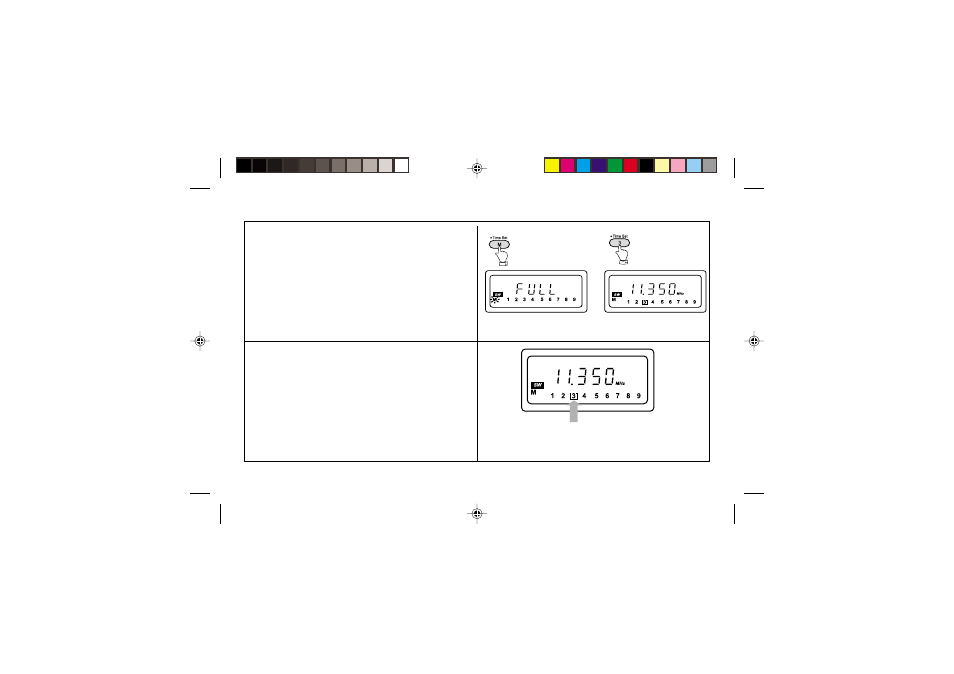
Note:
1. If all the preset memory locations are full pushing the
"M" button will cause the display to show "FULL". If
you still want to store a new station press any button
1-9 for more than 2 seconds, the new station will be
stored in the selected memory location, the original
station in this location will be cancelled.
2. Selecting a station or frequency that is already stored
in preset memory will cause the display to show "[ ]"
together with the stations preset memory location.
The symbol "[ ]" indicates that the frequency has al-
ready been stored.
See also other documents in the category Roberts Radio Recorders:
- R9927 (12 pages)
- R9995 (28 pages)
- RP16 (8 pages)
- R9999 (24 pages)
- RD-25 (24 pages)
- WM201 (64 pages)
- R9988 (28 pages)
- All Weather Radio R9965 (12 pages)
- R9903 (8 pages)
- 997 (16 pages)
- SolarDAB Solar Powered DAB Radio (20 pages)
- ecologic1 (28 pages)
- Revwal (8 pages)
- RD-41 (64 pages)
- Classic DAB (24 pages)
- R9947 (28 pages)
- unologic (28 pages)
- Ecologic 3 (24 pages)
- R761 (12 pages)
- R9928 (12 pages)
- R9914 (56 pages)
- R9958 (24 pages)
- R9962 (12 pages)
- R9993 (8 pages)
- ClassicLite (28 pages)
- WiFi Internet Radio WM-202 (72 pages)
- 996 (12 pages)
- FM RDS/DAB Digital Personal Radio RD14 (32 pages)
- R9921 (28 pages)
- Multi-Powered 2 Band Radio R9957 (12 pages)
- RP28 (7 pages)
- R250 (8 pages)
- R9966 (12 pages)
- R983 (20 pages)
- FM RDS/DAB Digital Radio RD-50 (20 pages)
- ecologic 2 (28 pages)
- Analogue World Radio R9968 (20 pages)
- The Digital Radio Collection (8 pages)
- R9954 (12 pages)
- FM RDS/DAB Digital Radio RD-50CFM (20 pages)