
Nokia X3-00 User Manual
Page 10
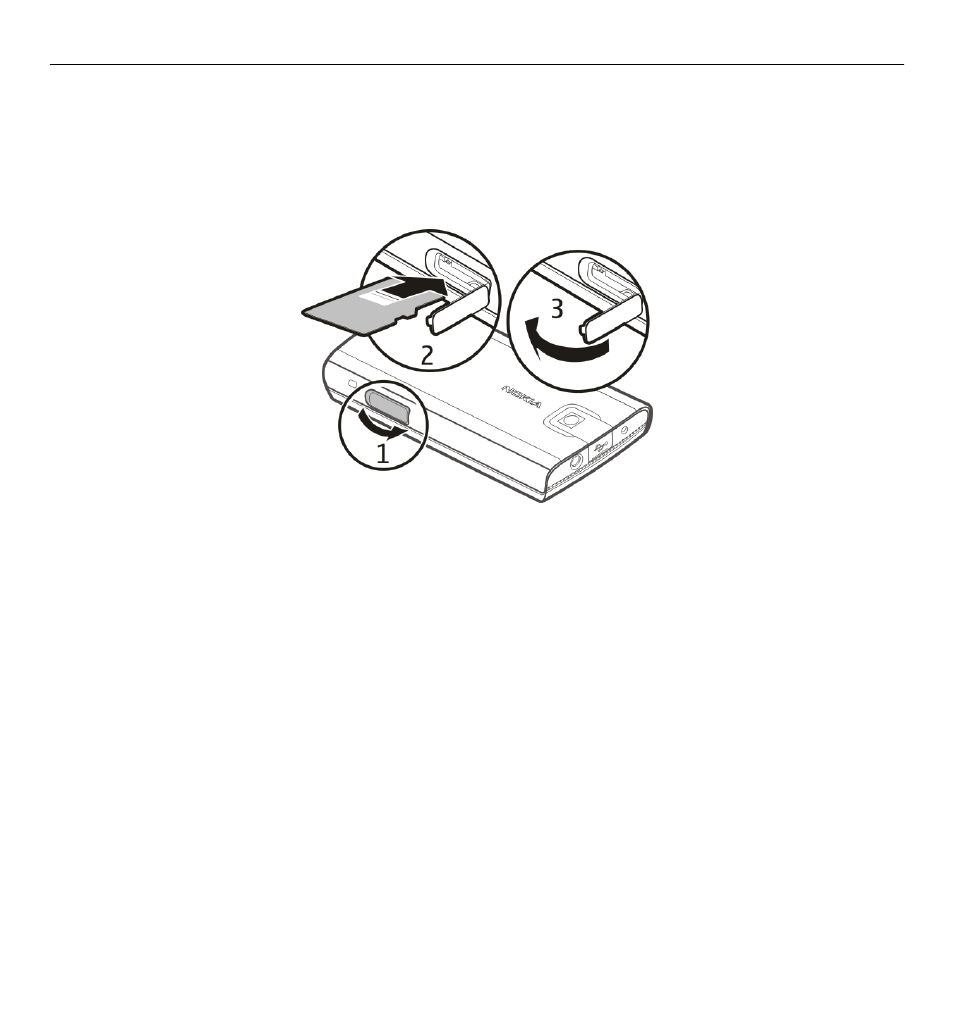
Your device supports microSD cards with a capacity of up to 8 GB. The size of a single
file must not exceed 2 GB.
Insert the memory card
1 Open the cover of the memory card slot.
2 Insert the card into the memory card slot with the contact surface facing down,
and press until it locks into place.
3 Close the cover of the memory card slot.
Remove the memory card
Important: Do not remove the memory card during an operation when the card
is being accessed. Doing so may damage the memory card and the device, and
corrupt data stored on the card.
You can remove or replace the memory card without switching the device off.
1 Ensure that no application is currently accessing the memory card.
2 Open the cover of the memory card slot.
3 Press the memory card slightly in to release the lock, and remove the card.
10 Get started
- 5510 (102 pages)
- 2310 (63 pages)
- 2310 (58 pages)
- 3660 (17 pages)
- 3660 (157 pages)
- N78 (368 pages)
- 5210 (106 pages)
- Nokia 1112 (56 pages)
- 7210 (185 pages)
- 2600 (66 pages)
- 2600 (2 pages)
- 2600 (185 pages)
- 6700 Slide (56 pages)
- 3510 (30 pages)
- 2100 (63 pages)
- 7020 (74 pages)
- 6300 (80 pages)
- E61i (241 pages)
- N97 (130 pages)
- N97 (357 pages)
- N71 (115 pages)
- 6510 (4 pages)
- 6670 (321 pages)
- N900 (283 pages)
- 2760 (69 pages)
- 2760 (99 pages)
- 9110i (26 pages)
- 8600 Luna (201 pages)
- 1616 EN (17 pages)
- 1616 (28 pages)
- 3109 (86 pages)
- E72 (150 pages)
- 9500 (112 pages)
- 3250 (2 pages)
- N72 (121 pages)
- XPRESSMUSIC 5220 (56 pages)
- 7370 (2 pages)
- 7370 (201 pages)
- 6170 (209 pages)
- E63 (143 pages)
- C3-00 (44 pages)
- 7610 (161 pages)
- 6310i (161 pages)
- 1280 (34 pages)
- 2690 (90 pages)