
Functions while displaying the control screen, Seek mode – Kenwood DDX7039M User Manual
Page 43
English 43
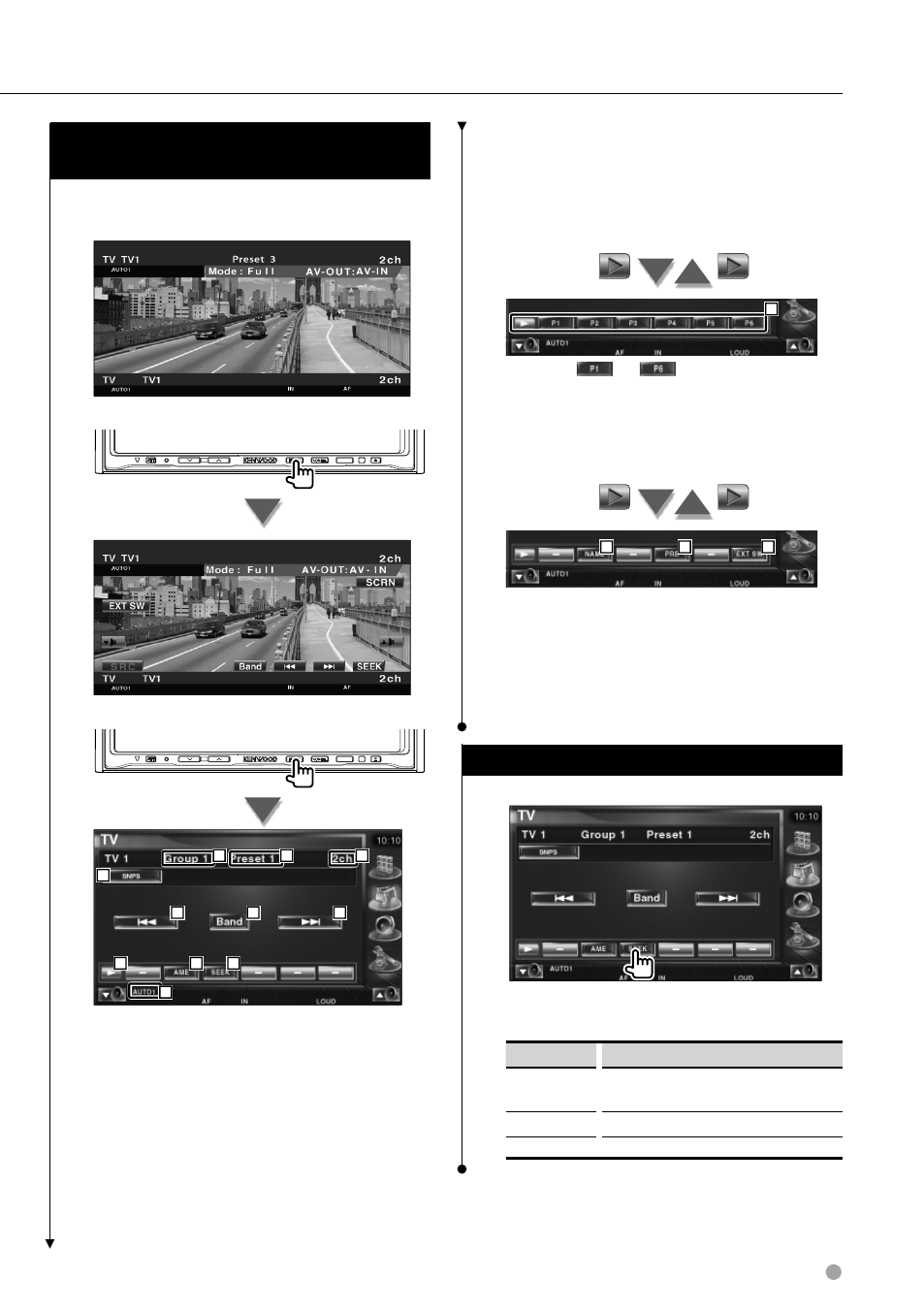
Functions While Displaying the Control
Screen
Switches to control screen to use various playback
functions.
SRC
SRC
2
4
3
3
5
6
1
7
8
10
9
1 Channel information display
2 Switches to TV1 or TV2.
3 Select a channel.
Use the
the channel tuning sequence.
4 Switches the button display.
5 Selects the Auto Memory mode.
Refer to
6 Switches the Seek mode.
Refer to
7 Indicates current Seek mode.
8 TV Area Group Dispaly
Refer to
9 Memory Number Display
p Channel Number Display
11
q When
to
buttons appear, you
can recall channels on memory.
For memory of broadcasting stations, see
12
13
14
w Sets a name to the tuned station. (page 45)
e Lists and selects memorized station. See
r Displays the external device control
screen. See
Seek mode
Sets a station selection.
The mode is switched in following order each
time you touch the button.
Display
Setting
"AUTO1"
Tunes in a station with good reception
automatically.
"AUTO2"
Tunes in stations in memory one after another.
"MANU"
Switches to the next frequency manually.