
Functions while displaying the control screen – Kenwood DDX7039M User Manual
Page 37
English 37
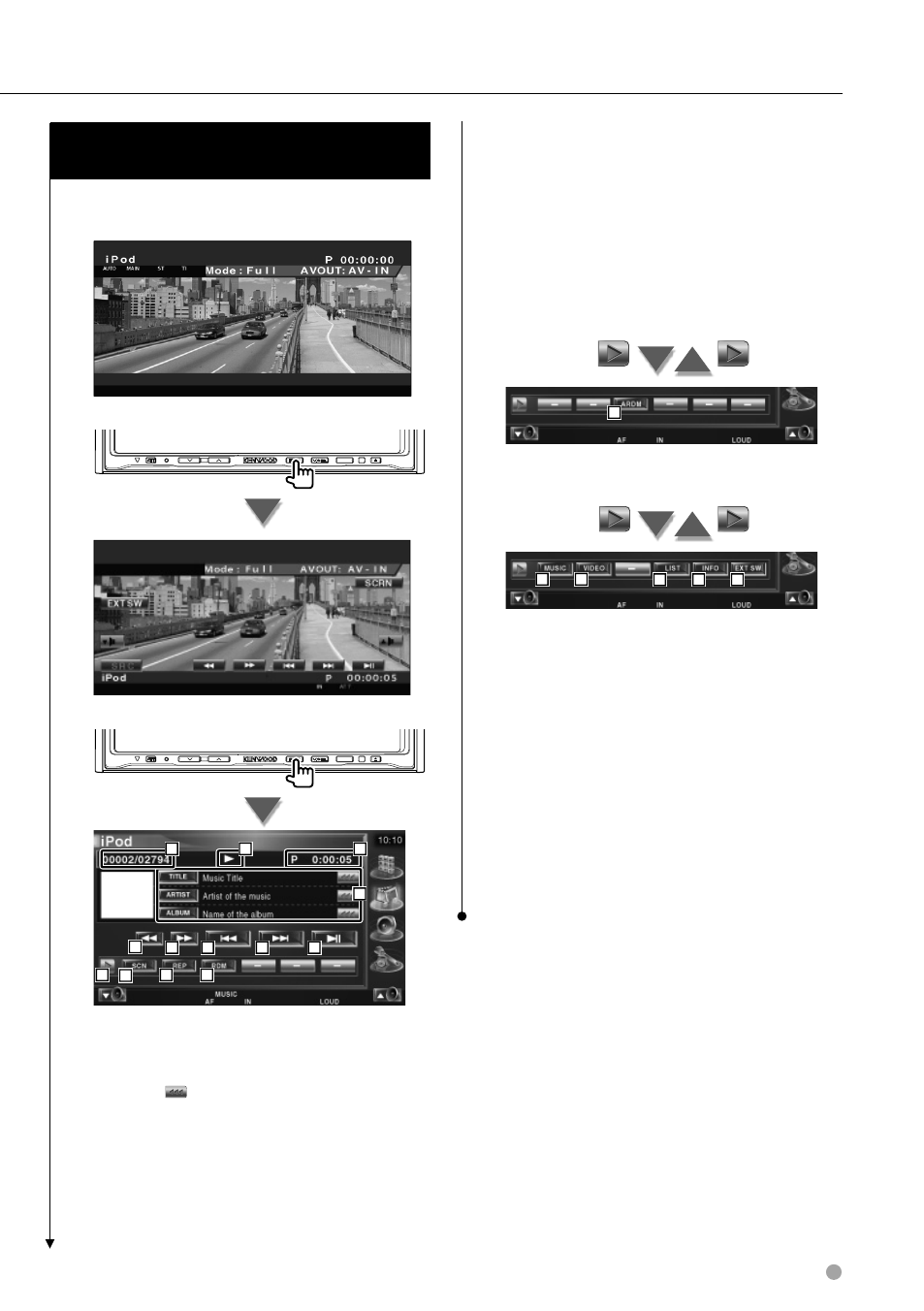
Functions while displaying the Control
Screen
Switches to control screen to use various playback
functions.
SRC
SRC
5
6
7
2
2
4
3
10
3
8
11
1
9
1 Music/Video Information Display
Selects the Title, Artist Name, Album Name
or iPod Name.
When is appeared, the text display is
scrolled by pressing it.
2 Fast Forward or Fast Backward.
3 Select Music/Video.
4 Plays or pause.
5 Switches the button display.
6 Starts or stops Scan Play (that plays the
beginning of each music or video one after
the other).
7 Repeats to play (the preset files or data).
8 Starts or stops Random play.*
1
9 Total number of music in the iPod and the
music number display
p Play Mode Display
q Play Time Display
12
w Starts or stops Album Random Play (plays
randomly from current album).*
1
15
16
17
13
14
e Display the list of music category. See List> (page 38). r Display the list of video category. See List> (page 38). t Displays the previous music/video list. See y Displays information screen of music/video being played. u Displays the external device control screen. See ⁄ • * 1 Disable when video is being played.