
Starting epson print cd - mac, Printing your cd/dvd design - mac – Epson Expression Premium XP-6100 All-in-One Printer User Manual
Page 218
218
Starting Epson Print CD - Mac
You can use Epson Print CD to design your disc by importing photos, adding text, and creating special
effects.
1.
Open the Epson Print CD program in the
Applications > Epson Software > Print CD
folder on your
Mac.
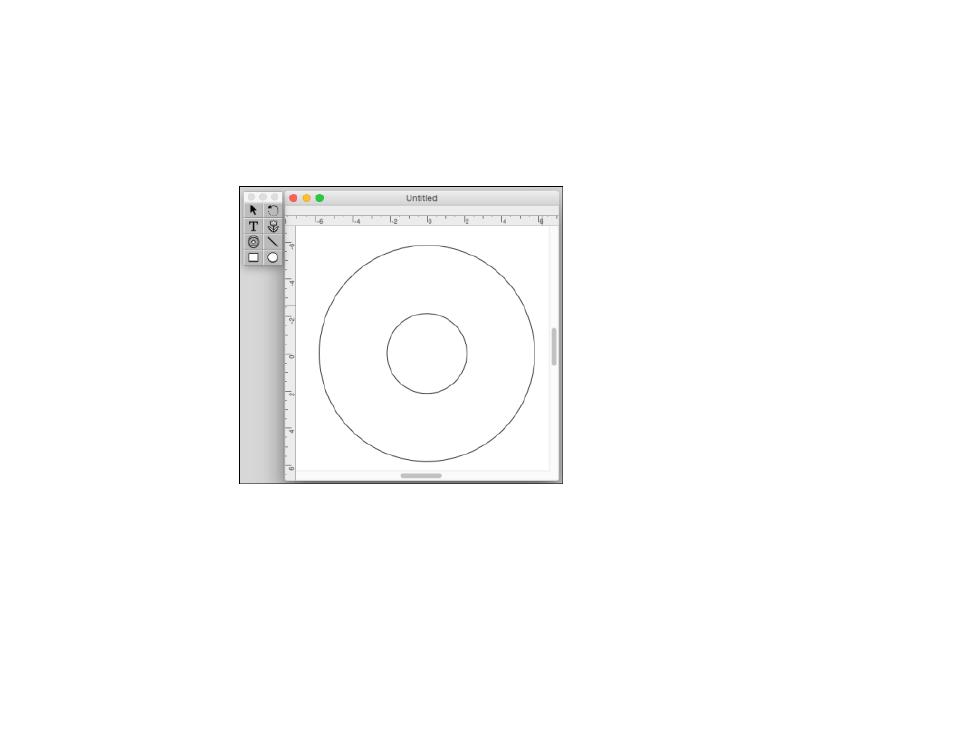
You see a screen like this:
2.
Use the icons on the left side of the screen to add a background image, picture, text, or graphic
elements.
3.
When you are finished creating your design, make sure you save it.
Parent topic:
Printing on CDs/DVDs from a Computer
Printing Your CD/DVD Design - Mac
After you create your design, you can print it on paper to test it, then print it on the CD or DVD that
contains your data, photos, video, or music. Make sure the disc is loaded for printing before you start.
See also other documents in the category Epson Printers:
- Stylus Pro 7800 (11 pages)
- Stylus Pro 4000 (49 pages)
- Stylus Photo R300 (2 pages)
- Stylus Pro 7000 (147 pages)
- AcuLaser C3000 (316 pages)
- Stylus Pro 7900 (24 pages)
- Stylus Pro 4450 (21 pages)
- 1000 (272 pages)
- T034120 (4 pages)
- T580300 (4 pages)
- 300 (91 pages)
- B 510DN (218 pages)
- B 510DN (190 pages)
- Stylus NX510 (8 pages)
- Stylus Photo RX580 (95 pages)
- T549300 (4 pages)
- B 500DN (168 pages)
- AculaserCX11NF (5 pages)
- 480SXU (24 pages)
- 4500 (317 pages)
- STYLUS RX500 (99 pages)
- 2100 (13 pages)
- Stylus NX215 (2 pages)
- T098320 (4 pages)
- T041020 (4 pages)
- R210 (8 pages)
- All-In-One Stylus Photo RX600 (164 pages)
- 777I (53 pages)
- T033120 (4 pages)
- Stylus CX7000F (8 pages)
- 60 (113 pages)
- T034220 (4 pages)
- WorkForce 40 Series (36 pages)
- T054220 (4 pages)
- Stylus CX3200 (11 pages)
- Stylus CX7800 (18 pages)
- T060220 (4 pages)
- 2500 (180 pages)
- AcuLaser CX11N (32 pages)
- AcuLaser CX11N (4 pages)
- 2000P (16 pages)
- T606600 (4 pages)
- Stylus CX6000 (18 pages)
- FS-4000DN (2 pages)
- MSDS T544700 (4 pages)